Setting up a system to make sure you look at the right numbers at the right time
Everything we do today can be marked as data, which has had a profound impact on our lives and business. More and more companies are putting their bets on big data and expecting to dig more business insights from it. However, compared to the enthusiasm of big companies, small businesses seemed a bit shilly-shally. Limited budgets to collect data and inadequate skills to understand complex scenarios are the leading causes of setbacks.
In my experience, small companies still have budget-friendly ways to deal with data and to thrill their business.
Size Is Not the Only Thing
Yes, big is good. But how big is big enough?
The limit of an Excel sheet is one million rows. If your daily transaction or customer base has not reached this number, you don’t need to worry about the “big” thing. In fact, you should consider variety and veracity more, instead of volume. With the same quality, the bigger, the better. And yet with the same quantity, better quality always wins.
Focus on the Right Data
Before scouting the competitors, you should focus on your realm. You already have the data at your fingertips. It’s important to recognize it so that the information can be properly cataloged and interpreted. If you have a store (such as a bakery, supermarket, or cafe) you’ll set revenue and customers as high priorities. Therefore, you should pay attention to the transactional data, in-store traffic, and cash flow.
Transactional data
Image source: Author
What they purchased
How much they purchased
When they made their purchase
How they paid for their purchase
What promotions or coupons they use
In-Store Traffic
How many people visit my store
When they visit
How long they spend in my store
How many of them are regular customers
Don’t panic. Highly-tuned motion sensors can track the location of customers as they move throughout the store. You don’t need to know which customer is which, but you will be able to get a sense of how many customers shop in each department.
How is my inventory? ( overstock / adequate / understock)
How are my cost units? (Are they reasonable and stable?)
How are my revenue and growth rate?
How are my profits and profit margin? ( Profit margin≠ Profit)
If you have an online shop or a website, you need to focus on web traffic, conversion rate, and campaign performance.
For startups, the lack of traction is the top cause leading to failure. Fortunately, we have plenty of analytic tools to evaluate your online shop’s or website’s performance. Now you have the best mining tools on hand, you just need to find out the entrance.
All About Traffic
Let’s start with the right questions.
How many people visited my website? Where are they from?
How do they interact with my website? How can I retain them?
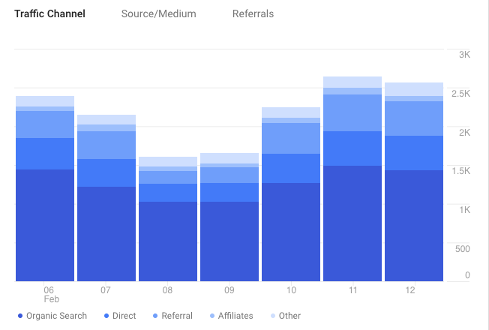
Channels
Channels indicate how people found your site. The Source/Medium report below shows you in more detail where people came from, for example, YouTube, Facebook, Instagram.
Source/Medium report (Image source: Author)
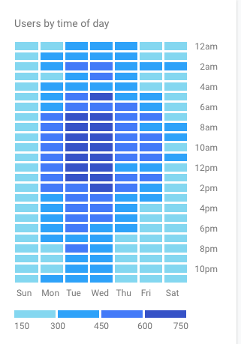
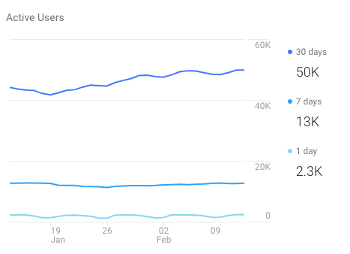
Interaction (time)
When do they visit your website? If you have a plan to make a campaign, a promotion, or a post, now you know the best time to attract the user’s attention.
Image source: Author
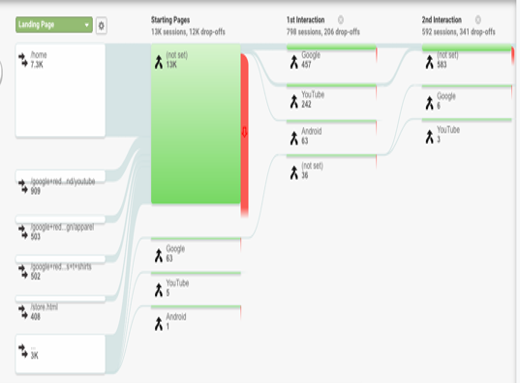
Interaction (behavior flow)
When do they use your website?
With user behavior flow, you can see each page’s performance, where they get in, where they drop out, and the proportion.
Google Analytics — Behavior flow
With the interaction record, you can understand their interest and behavior more intuitively — what catches their attention, the hot area, and so on. Then you will know what and where on your website can be improved.
Image source: Author
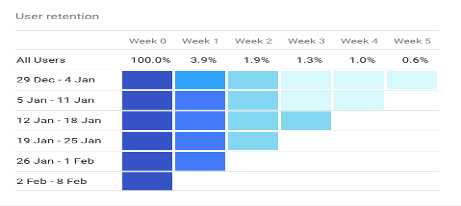
Customer retention
Have you experienced this? You paid heavily to acquire new users but they churned very quickly. Their customer lifetime value (LTV) is lower than their cost of acquisition. The more you invest in them, the more you lose. To be honest, not all customers can yield revenue and profit — some of them just consume your resources. That’s why customer retention is vital. You may ask very good questions, such as:
How long do most customers stick around? (Daily active user / Weekly active user/ Monthly active user)
How long do various customer personas stick around?
Have recent product changes helped or impeded retention?
What changes can improve retention?
Image source: Author
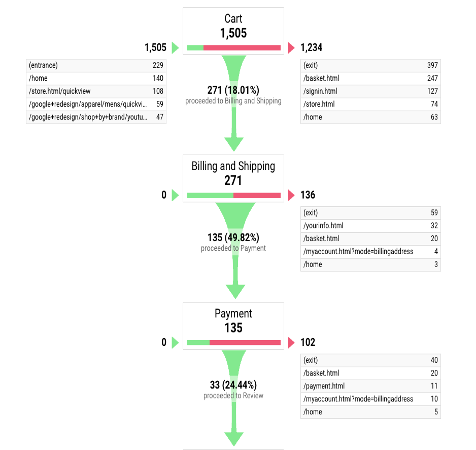
Customer conversion
Whatever actions you have executed or you are planning, the ultimate destination for business is revenue. The conversion rate leads you to understand how many visitors become your users and how much they contribute. Moreover, you can break down each procedure and look deeper. Any recognition of strengths and weaknesses may help you optimize the conversion rate and improve the revenue or profit.
In real business, things could be more complicated. However, I hope this article can help you build a 3-D scanner and let you have a crystal-clear picture of your business.
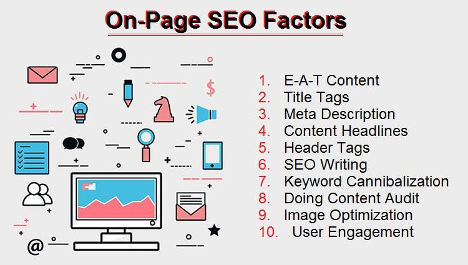
This article isn’t about the importance of tags and title optimization or the basics of SEO. Instead, it is intended to provide advanced on-page SEO techniques that are talked about less often, but still significant for anyone with an online presence.
Top On-page SEO Techniques That Still Work
Aside from the basic strategies, like proper usage of HTML tags, page title, and meta description optimization, our chat participants shared some practical strategies that you can implement to increase your search traffic.
Semantically Related Terms
Google’s algorithms are constantly updated, so it is important to keep up with the latest news in the industry. Now, keyword research requires a more holistic, upgraded approach. Today, site owners and SEO specialists need to better understand semantic search to ensure that their content is relevant to their audience.
David Rosam — “Semantically related content/terms, being aware of searcher intent, in-depth content, internal linking, good writing.”
By discovering terms and phrases that are related to your primary keyword, you can unlock a fresh source of targeted traffic to your site. By trying to take advantage of the search engine’s semantic indexing behaviors and performing thorough keyword research, you can discover synonyms and semantically related terms, in addition to keywords that you initially set out to research.
Ryan Glass — “semantically aligned terms, answering questions people actually ask, optimizing title & meta desc for CTR.”
Content Guided by Search Intent
Google has divided its massive stores of data to better understand user intent and provide the most relevant search results to its users. Search intent is not about who the searchers are, but what they really want.
According to a popularly referred study by Andrei Broder, traditionally, there are three main categories of web search queries: navigational, informational, and transactional. Not knowing the real intent of your target user weakens your chances of providing them with what they are looking for.
A successful SEO strategy must include understanding how to create content and deliver experiences that are appealing and relevant to your audience.
Klaus Junginger — “Concise text blocks with proper headers, text content mixed w/ imagery (ALT etc), Search intent oriented copies and layout.”
Speaking the Language of Your Searchers
To develop smarter content strategies and provide a better experience to your users, it is important to analyze how your users think about and search for your product or service when looking for information on the Internet. Natural language processing (NLP) has changed the way the online world works.
Search has shifted from simple keywords to intent and context. Digital marketers need to focus more on how people are searching, consider using natural language in the content, and take into account the fact that different searchers may not use the same terms.
Nathan Brown — “Understanding Semantic Text & NLP to go beyond keywords — including TF/IDF, phrase matching, schema, and more.”
To adapt your content to how people perform searches these days, you also need to pay attention to natural language. As more people are using digital systems, it is becoming critical to optimize your pages for voice-based queries that have a different nature; these tend to be longer phrases and even complete questions. If you want to adapt your content to a natural language search, you need to include complete sentences that communicate full meaning.
Even though SEO means “search engine optimization,” you need to remember that there are real people on the other side of the screen. Therefore, you need to write content for them and make it as useful and relevant as possible.
The Biggest Concerns When Structuring a Page
Every website needs a certain structure so that your users can easily navigate through it by clicking from one page to the other. Then, the search engine bots crawl your site’s structure to index the content to return it into the search results. This means that a good site structure makes it easier for crawlers to access and index your content.
These are the several pitfalls that people can fall into when structuring a webpage:
Having Too Many Pages Without a Clear Message
Offering too many options can overwhelm and confuse your users. Some UX designers believe that all pages should be accessible in three clicks, but this is a myth. Instead, it’s important to focus on simpler navigation, fewer clicks don’t make users happier, but the ease of navigation does.
Pole Position Marketing — “Too many pages are structured without the message and goal in mind. That has to come first.”
Every click must take your user closer to their goal, and every page of your site should have a clear purpose. Ideally, the design and other elements that build communication need to work together to create a clear, unified message to your site visitors.
Chris Countey — “A page’s intent should be crystal clear to both the visitor and search engines; copy+code+ux=win.”
Not Encouraging Users to Complete the Desired Action
If you want your site visitors to take a certain actions, you need to give them a reason to do it. Will your page provide them with valuable information? Will they get what they want after viewing it? This should be aligned with your value proposition, and call-to-action buttons should be compelling enough to attract your users’ attention and persuade them to complete a form or perform another action. A good CTA is visually striking, action-oriented, clear, and easy to understand.
AJ Ghergich — “Does my Above-the-Fold content induce strong scroll-depth and eventual action?”
Putting Sales Ahead of Your Users’ Needs
It is all about your users. The true measure of your website’s performance lies with the only people who determine its success: your site visitors. When structuring a webpage, you need to put your users’ interests and needs ahead of your own. Place what is the most important to them at the top of your page and keep in mind that “Great Brands Aim For Customers’ Hearts, Not Their Wallets.”
Marianne Sweeny — “Putting business concerns ahead of user needs. Structure content like a newspaper, general to specific, most important at the top.”
Trying To Do SEO After the Design
Unfortunately, some site owners don’t think about SEO until after having their website designed. As a result, these sites have a beautiful design, but fail to rank high in search engine results. The truth is, SEO must be an integral part of website design and must always be planned out before setting up your site. You need to ensure that search engines can easily crawl and understand your content properly.
Chris Countey — “Don’t try to ‘SEO’ a site after design if you can avoid it. Bring SEO into the development from day 1.”
Some of our chat guests also believe that when it comes to page structure, everything comes down to user experience. Barry Feldman provides 40 practical website improvement tactics for a better UX that can help you make the experience of your users smooth and pleasant.
Carolyn Lyden — “UX (and ALL that it entails) is really what it’s boiling down to. Google takes user signals, so overall UX is critical.”
Your Web Content Writer — “Finding balance. Users love visual and hate big chunks of text. They hate slow load times even more though.”
Good page structure is a result of careful thinking and accurate organization. Avoiding these pitfalls is a good starting point in getting the structure of your pages right.
Is it possible to rank a website using only on-page SEO?
Improving your site’s ranking requires a smart, well-planned strategy that includes various practical techniques. However, is it possible to rank a website using only on-page SEO tactics?
Most of our chat participants agree that on-page SEO is enough, but only in industries with low competition. Otherwise, it will be very difficult to rank without quality backlinks.
Content King — “Sure, but only in low competition niches. When competition is moderate/high, you need links to rank!”
Alex Singleton — “If a given query concerns a competitive subject/niche, ranking will be difficult if competition has better web content.”
Ryan Jones — “Yes, you can rank using only on-page SEO. But it’s not as easy as having links.”
On the other hand, some of our guests believe that if you create valuable, shareable content that solves your audience’s pain points, the links will follow.
Carolyn Lyden — “If your on-page SEO is 10/10, your content is useful and solves user issues, then links & ranking will come.”
Bill Slawski — “Create shareable, linkable content aimed at a specific audience written based upon expertise, authoritativeness & trust.”
Some of the most important elements of search engine optimization happen on your site. By implementing basic on-page SEO practices, coupled with strong content, you have a better chance of winning the SEO race.
The Most Common On-page SEO Issues and How to Fix It
At the end of our discussion, we asked our chat guests to name the most common on-page SEO issues.
1. Underestimating Image SEO
“I’m going to go with image file titles on this one. Image SEO is still so very underrated.” Mike Bryant pointed out that image optimization remains underrated, as some site owners still don’t optimize their images for SEO properly. Images can make your articles or pages more visually appealing and compelling and, they contribute to your SEO efforts as well.
To optimize your images, pay attention to these must-know tips:
Name your image files properly using acceptable keywords.
If you are experiencing issues attracting new site visitors, retaining them on your pages, and achieving your site goals, the problem may lie in the fact that your pages lack a clear focus. If your site tries to be all things to all people, it can end up appealing to nobody.
If your content talks about everything and how you can answer every single question and solve every single problem, it means that your site focus is too scattered. As a result, it will be very confusing to your users. It is crucial to make your site more focused and consistent and try to appeal to your perfect potential users.
Optimisey — “Lack of focus. ‘We want to rank for *everything*… now!’ is often problem number one.”
Jo Marie — “Mixed messages are death to on-page SEO. Stay on topic and use all on-page signals to make sure you do.”
3. Ignoring Meta Description Optimization
Paul Shapiro says that optimization for click-through rate is often neglected and it remains a common SEO issue on may websites.
The key feature for improving CTR from search results pages is the meta description. Even though Google stated long ago that meta descriptions are not a ranking factor, by writing killer descriptions you can influence the decision of searchers as to whether they want to click through your content or not. As a result, quality meta descriptions lead to improved click-through rates and, thus, site rankings.
4. Slow Page Load Time
A good user experience encompasses multiple aspects, including site loading speed. Nearly half of web users anticipate a site to load in just 2 seconds or even less! Slow pages can end up having higher bounce rates and a lower time on pages.
Use services like PageSpeed Insights, GTmetrix, and YSlow to access the current state of your website. The good thing about these tools is that in addition to insights into how well your site loads, they provide practical suggestions for improving your page’s performance.
Fanny Heuck — “The page loading time. Most of the time due to huge pictures — use jpgepmini or tinypng to reduce the size.”
Pay attention to the above on-page SEO issues to make sure that you pick the right path in optimizing your site’s on-page aspects.
Keep in mind that on-page SEO is an ongoing and frequent process. Through research, experimentation, and experience, you need to prioritize your SEO challenges and focus on those elements that deliver the best results. If you need SEO help, contact: [email protected] or give us a call at (469) 536-8478
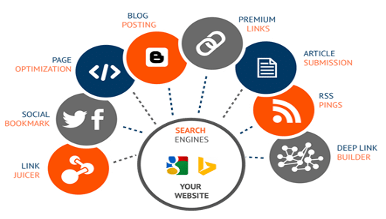
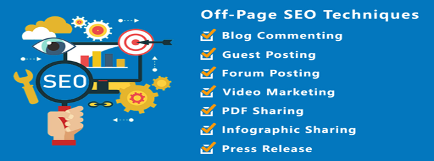
If this on-page SEO tutorial intrigues you, consider looking into off-page SEO also. Below is some infographic about off-page SEO you may consider.
Search engine optimization, or SEO, is incredibly important for marketers. When you search engine optimize your client’s web pages — including blog posts — you’re making the client’s website more visible to people who are using search engines (like Google) to find your client’s product or service. But does blog content really help their business organically rank on search engines?
Blogging helps boost SEO quality by positioning the website as a relevant answer to customers’ questions. Posts that use a variety of on-page SEO tips for blogs can give more opportunities to rank in search engines and make the website more appealing to visitors
It’s clear blog content does contribute to SEO, Google’s many algorithm updates can make publishing the right kind of blog content tricky if you don’t know where to start. Some search engine optimization blog ranking factors have stood the test of time while others are considered “old-school.” Here are a few of the top-ranking factors that can, directly and indirectly, affect blog SEO.
Pro tip: As a rule of thumb, take time to understand what each of this SEO for blogging factors does, but don’t try to implement them all at once. They each serve a specific purpose and should be used to meet a specific SEO goal for your blog. Listen to HubSpot’s Matt Barby and Victor Pan take on this topic in this podcast episode.
Factors That Affect SEO For A Blog
1. Dwell Time
Although dwell time is an indirect ranking factor for Google, it’s a critical factor in the user experience — and we know that user experience is king when it comes to blogging SEO. Dwell time is the length of time a reader spends on a page on your blog search engine optimization site. From the moment a visitor clicks on your site in the SERP, to the moment they exit the page is considered to dwell time. This metric indirectly tells search engines like Google how valuable your content is to the reader. It makes sense that the longer they spend on the page, the more relevant it is to them.
However, there’s a reason this metric is an indirect indicator for blogging SEO— it’s completely subjective. The search engine algorithms don’t know your content strategy. Your blog could be focused on short-form content that takes just a minute or two to read. You might also include pertinent information at the beginning of your blog posts to give the best reader experience, which means less time spent on the page. So yes, dwell time can affect SEO for blogging, but don’t manipulate your content to change this metric if it doesn’t make sense for your content strategy.
2. Page Speed
We mentioned earlier that visual elements on your blog can affect page speed, but that isn’t the only thing that can move this needle. Unnecessary code and overuse of plugins can also contribute to a sluggish blog site. Removing junk code can help your pages load faster, thus improving page speed. If you’re not sure how to find and remove junk code, check out HTML-Cleaner. It’s an easy-to-use tool that doesn’t require coding knowledge. It simply shows you the unnecessary code and lets you remove it with the click of a button.
I also recommend taking an inventory of your blogging SEO site plugins. Decide which ones you need to keep your blog running day-to-day and which ones were installed as a fix for a temporary issue. Plugins that affect the front-end of your site are a threat to page speed, and odds are, you can uninstall more of these plugins than you think to increase your overall site speed.
3. Mobile Responsiveness
More than half of Google’s search traffic in the United States comes from mobile devices. On an individual level, your blog site might follow that same trend. There’s no way around it — optimizing your blog site for mobile is a factor that will affect your SEO for blogging metrics. But what exactly does it mean to optimize a website for mobile? The industry rule of thumb is to keep things simple. Most pre-made site themes these days are already mobile-friendly, so all you’ll need to do is tweak a CTA button here and enlarge a font size there. Then, keep an eye on how your site is performing on mobile by taking a look at your Google Analytics dashboard and running a mobile site speed test regularly.
4. Index Date
Search engines aim to provide the most relevant and accurate information available. A factor search engines use when determining what’s relevant and accurate is the date a search engine indexes the content. Indexing means a search engine finds content and adds it to its index. Later, the page can be retrieved and displayed in the SERP when a user searches for keywords related to the indexed page.
You might be wondering: Is the date the content was indexed the same as the date it was published?
The answer: yes and no. If a blog post is published for the first time, it’s likely that say, a Google crawler will index that post the same day you publish it. But content can be backdated for several legitimate reasons, too, like archiving information or updating a sentence or two.
One way to positively affect this blog search engine optimization factor is to implement a historical optimization strategy. This strategy works well on blogs that have been established for a few years and have a fair amount of content already. By updating these older posts with new perspectives and data, you’ll be able to significantly impact your blogging SEO without creating a lot of net new content. Site crawlers will reindex the page — taking into account the updated content — and give it another opportunity to compete in the SERP. It’s truly a win-win.
5. Recent Data
Recent data, another indirect ranking factor of SEO for a blog, should be included in posts. Recent data gives visitors relevant and accurate information which makes for a positive reader experience. When you include a link to a credible site that has original, up-to-date data, you’re telling the search engine that this site is helpful and relevant to your readers (which is a plus for that other site). You’re also telling the search engine that this type of data is in some way related to the content you publish. Over time, your readers will come to appreciate the content which can be confirmed using other metrics like increased time on page or lower bounce rate.
1. Identify the target audience for your blog posts for SEO.
No matter what industry your blog targets, you’ll want to identify and speak to the primary audience that will be reading your content. Understanding who your audience is and what you want them to do when they click on your article will help guide your blog strategy.
Buyer personas are an effective way to target readers using their buying behaviors, demographics, and psychographics. Without this insight, you could be producing grammatically correct and accurate content that few people will click on because it doesn’t speak to them on a personal level.
2. Conduct keyword research.
Now that you’ve selected your target audience and prepared a buyer persona, it’s time to find out what content your readers want to consume. Keyword research can be a heavy task to take on if you don’t begin with a strategy. Therefore, I recommend starting with the topics your SEO for blogging will cover, then expanding or contracting your scope from there. For an in-depth tutorial, check out our how-to guide on keyword research.
3. Add visuals.
Search engines like Google value visuals for certain keywords. Images and videos are among the most common visual elements that appear on the search engine results page. In order to achieve a coveted spot in an image pack or a video snippet, you’ll want to design creative graphics, use original photos and videos, and add descriptive alt text to every visual element within your blog post.
Alt-text is a major factor that determines whether or not your image or video appears in the SERP and how highly it appears. Alt-text is also important for screen readers so that visually impaired individuals have a positive experience consuming content on your search engine optimization blog site.
4. Write a catchy title.
The title of your blog post is the first element a reader will see when they come across your article, and it heavily influences whether they’ll click or keep scrolling. A catchy title uses data, asks a question, or leads with curiosity to pique the reader’s interest.
According to Coscheduler’s Headline Analyzer, the elements of a catchy title include power, emotion, uncommon, and common words. In the right proportions, these types of words in an SEO blog post’s title will grab your readers’ attention and keep them on the page.
Here’s an example of a catchy title with a Coschedule Headline Analyzer Score of 87:
The Perfect Dress Has 3 Elements According to This Popular Fashion Expert
Highlighted in yellow are common words. They’re familiar to the reader and don’t stray too far from other titles that may appear in the SERP.
“Expert” is an emotional word, according to Coschedule. In this example, the word expert builds trust with the reader and tells them that this article has an authoritative point of view.
Purple words are power words — this means they capture the readers’ attention and get them curious about the topic.
Another element in this title is the number three. This signals to the reader that they’ll learn a specific amount of facts about the perfect dress.
5. Include an enticing CTA.
What’s a blog post without a call to action? The purpose of a CTA is to lead your reader to the next step in their journey through your blog. The key to a great CTA is that it’s relevant to the topic of your existing blog post and flows naturally with the rest of the content. Whether you’re selling a product, offering a newsletter subscription, or wanting the reader to consume more of your content, you’ll need an enticing CTA on every blog post you publish.
CTAs come in all types of formats, so get creative and experiment with them. Buttons, hyperlinks, and widgets are some of the most common CTAs, and they all have different purposes. For instance, you should add a bold, visible CTA like a button if you want the reader to make a purchase. On the other hand, you can easily get a reader to check out another SEO for blogging post by providing a hyperlink to it in the conclusion of the current article.
6. Focus on the reader’s experience.
Any great writer or SEO for a blog will tell you that the reader experience is the most important part of a blog post. The reader experience includes several factors like readability, formatting, and page speed. That means you’ll want to write content that’s clear, comprehensive of your topic, and accurate according to the latest data and trends. Organizing the content using headings and subheadings is important as well because it helps the reader scan the content quickly to find the information they need. Finally, on-page elements like images and videos have an impact on page speed. Keep image file sizes low (250 KB is a good starting point) and limit the number of videos you embed on a single page. By focusing on what the reader wants to know and organizing the post to achieve that goal, you’ll be on your way to publishing optimized SEO blog posts for the search engine.
Now, let’s take a look at these blog SEO tips that you can take advantage of to enhance your content’s searchability.
SEO Tips For Blogs
1. Use 1–2 long-tail keywords.
2. Use keywords strategically throughout the blog post.
3. Optimize for mobile devices.
4. Optimize the meta description.
5. Include image alt text.
6. Limit topic tags.
7. Include user-friendly URL structures.
8. Link to related blog posts.
9. Review metrics regularly.
10. Organize by topic cluster.
11. Publish evergreen content.
12. Update existing content.
Note: This list doesn’t cover every SEO rule under the sun. Rather, the following tips are the on-page factors to get you started with an SEO strategy for your blog.
Use 1–2 long-tail keywords
Optimizing your blog posts for keywords is not about incorporating as many keywords into your posts as possible. Nowadays, this actually hurts your blogging SEO because search engines consider this keyword stuffing (i.e., including keywords as much as possible with the sole purpose of ranking highly in organic search).
It also doesn’t make for a good reader experience — a ranking factor that search engines now prioritize to ensure you’re answering the intent of your visitors. Therefore, you should use keywords in your content in a way that doesn’t feel unnatural or forced.
A good rule of thumb is to focus on one or two long-tail keywords per blog post. While you can use more than one keyword in a single post, keep the focus of the post narrow enough to allow you to spend time on blog search engine optimization for just one or two keywords.
You may be wondering: Why long-tail keywords?
These longer, often question-based keywords keep your post focused on the specific goals of your audience. For example, the long-tail keyword “how to write a blog post” is much more impactful in terms of SEO for blogging than the short keyword “blog post”.
Website visitors searching long-tail keywords are more likely to read the whole post and then seek more information from you. In other words, they’ll help you generate the right type of traffic — visitors who convert.
2. Use keywords strategically throughout the SEO blog posts.
Now that you’ve got one or two keywords, it’s time to incorporate them in your blog post. But where is the best place to include these terms so you rank high in search results?
There are four essential places where you should try to include your keywords: title tag, headers & body, URL, and meta description.
Title Tag
The title (i.e., headline) of your blog post will be a search engine’s and reader’s first step in determining the relevancy of your content. So, including a keyword here is vital. Google calls this the “title tag” in a search result.
Be sure to include your keyword within the first 60 characters of your title, which is just about where Google cuts titles off on the SERP. Technically, Google measures by pixel width, not character count, and it recently increased the pixel width for organic search results from approximately 500 pixels to 600 pixels, which translates to around 60 characters.
Long title tag? When you have a lengthy headline, it’s a good idea to get your keyword in the beginning since it might get cut off in SERPs toward the end, which can take a toll on your post’s perceived relevance.
In the example below, we had a long title that went over 65 characters, so we placed the keyword near the front.
Headers & Body
Mention your keyword at a normal cadence throughout the body of your post and in the headers. That means including your keywords in your copy, but only in a natural, reader-friendly way. Don’t go overboard at the risk of being penalized for keyword stuffing.
Before you start writing a new blog post, you’ll probably think about how to incorporate your keywords into your SEO blog posts. That’s a smart idea, but it shouldn’t be your only focus, nor even your primary focus.
Whenever you create content, your primary focus should be on what matters to your audience, not how many times you can include a keyword or keyword phrase in that content. Focus on being helpful and answering whatever question your customer might’ve asked to arrive on your post. Do that, and you’ll naturally optimize blog posts for SEO of important keywords, anyway.
URL
Search engines also look at your URL to figure out what your post is about, and it’s one of the first things it’ll crawl on a page. You have a huge opportunity to optimize your URLs on every post you publish, as every post lives on its unique URL — so make sure you include your one to two keywords in it.
In the example below, we created the URL using the long-tail keyword for which we were trying to rank: “email marketing examples.”
Meta Description
Your meta description is meant to give search engines and readers information about your blog post’s content. Meaning, you must use your long-tail term so Google and your audience are clear on your post’s content.
At the same time, keep in mind the copy matters a great deal for click-through rates because it satisfies certain readers’ intent — the more engaging, the better.
3. Blogging SEO Optimize for mobile devices.
We learned earlier that more people use search engines from their mobile phones than from a computer.
And for all those valuable queries being searched on mobile devices, Google displays the mobile-friendly results first. This is yet another example of Google heavily favoring mobile-friendly websites — which has been true ever since the company updated its Penguin algorithm in April 2015.
So, how do you make your blog mobile-friendly? By using responsive design. Websites that are responsive to mobile allow blog pages to have just one URL instead of two — one for desktop and one for mobile, respectively. This helps your post’s SEO a blog because any inbound links that come back to your site won’t be divided between the separate URLs.
As a result, you’ll centralize the blogging SEO power you gain from these links, helping Google more easily recognize your post’s value and rank it accordingly.
Pro tip: What search engines value is constantly changing. Be sure you’re keeping on top of these changes by subscribing to Google’s official blog.
4. Optimize the meta description.
To review, a meta description is an additional text that appears in SERPs that lets readers know what the link is about. The meta description gives searchers the information they need to determine whether or not your content is what they’re looking for and ultimately helps them decide if they’ll click or not.
The maximum length of this meta description is greater than it once was — now around 300 characters — suggesting it wants to give readers more insight into what each result will give them.
So, in addition to being reader-friendly (compelling and relevant), your meta description should include the long-tail keyword for which you are trying to rank.
In the following example, I searched for “email newsletter examples.”
The term is bolded in the meta description, helping readers make the connection between the intent of their search term and this result. You’ll also see the term “E-Newsletter” bolded, indicating that Google knows there’s a semantic connection between “email newsletter” and “E-Newsletter.”
Note: Nowadays, it’s not guaranteed that your meta description is always pulled into SERPs as it once was. As you can see in the above image, Google pulls in other parts of your blog post that includes the keywords searched, presumably to give searchers optimal context around how the result matches their specific query.
Let me show you another example. Below are two different search queries delivering two different snippets of text on Google SERPs. The first is a result of the query “no index no follow,” and pulls in the original meta description:
The second is a result of the query “noindex nofollow,” and pulls in the first instance of these specific keywords coming up in the body of the blog post:
When you incorporate image alt text, an image’s name in your blog may go from something like, “IMG23940” to something accurate and descriptive such as “puppies playing in a basket
While there’s not much you can do to influence what text gets pulled in, you should continue to optimize this metadata, as well as your post, so search engines display the best content from the article. By creating reader-friendly content with natural keyword inclusion, you’ll make it easier for Google to prove your post’s relevancy in SERPs for you.
5. Include image alt text.
Blog posts shouldn’t only contain text — they should also include images that help explain and support your content. However, search engines don’t simply look for images. Rather, they look for images with image alt text.
You may be wondering why this is. Since search engines can’t “see” images the same way humans can, an image’s alt text tells the search engine what an image is about. This SEO for a blog ultimately helps those images rank in the search engine’s images results page.
Image alt text also makes for a better user experience (UX). It displays inside the image container when an image can’t be found or displayed. Technically, alt text is an attribute that can be added to an image tag in HTML.
When you incorporate image alt text, an image’s name in your blog may go from something like, “IMG23940” to something accurate and descriptive such as “puppies playing in a basket.”
Image alt text should be descriptive in a helpful way — meaning, it should provide the search engine with context to index the image if it’s in a blog article related to a similar topic.
To provide more context, here’s a list of things to be sure you keep in mind when creating alt text for your SEO blog posts’ images:
Describe the image
Leave out “image of… “— start with the image description instead
Be specific in your description
Keep it under 125 characters
Use your keywords (but avoid keyword stuffing)
HubSpot customers:The SEO Panel will recognize whether or not you have optimized your images. Though these elements are not as important as some other SEO for a blog, they’re still necessary (not to mention, easy to add).
6. Limit topic tags
Topic tags can help organize your blog content, but if you overuse them, they can actually be harmful. If you have too many similar tags, you may get penalized by search engines for having duplicate content.
Think of it this way, when you create a topic tag (which is simple if you’re a HubSpot user, as seen here), you also create a new site page where the content from those topic tags will appear. If you use too many similar tags for the same content, it appears to search engines as if you’re showing the content multiple times throughout your website. For example, topic tags like “blogging,” “blog,” and “blog posts” are too similar to one another to be used on the same post.
If you’re worried that your current blog posts have too many similar tags, take some time to clean them up. Choose about 15–25 topic tags that you think are important to your blog and that aren’t too similar to one another. Then only tag your SEO blog posts with those keywords. That way, you won’t have to worry about duplicate content.
Here at HubSpot, we use a Search Insights Report to map specific MSV-driven keyword ideas to a content topic each quarter. The process helps us target a handful of posts in a set number of topics throughout the year for a systematic approach to blogging SEO and content creation.
7. Include user-friendly URL structures.
Before you publish your blog post, take a careful look at its URL structure. Is it long, filled with stop-words, or unrelated to the post’s topic? If so, you might want to rewrite it before it goes live.
The URL structure of your web pages (which are different from the specific URLs of your posts) should make it easy for your visitors to understand the structure of your website and the content they’re about to see. Search engines favor web page URLs that make it easier for them and website visitors to understand the content on the page.
This differentiation is baked into the HubSpot blogs’ respective URL structures. If I decided to go to the Marketing section from this main page, I would be taken to the URL http://blog.hubspot.com/marketing.
If we want to read the Sales section, all we have to do is change where it says “marketing” in the URL to “sales”:
This URL structure helps me understand that “/marketing” and “/sales” are smaller sections — called subdirectories — within the larger blog.
What if there’s a specific article we want to read, such as “How to Do Keyword Research: A Beginner’s Guide”? Its URL structure — http://blog.hubspot.com/marketing/how-to-do-keyword-research-ht — denotes that it’s an article from the Marketing section of the blog.
In this way, URL structure acts as a categorization system for readers, letting them know where they are on the website and how to access new site pages. Search engines appreciate this, as it makes it easier for them to identify exactly what information searchers will access on different parts of your blog or website.
Pro tip: Don’t change your blog post URL after it’s been published — that’s the easiest way to press the metaphorical “reset” button on your blogging SEO efforts on that post. If your URL is less descriptive than you’d like or it no longer follows your brand or style guidelines, your best bet is to leave it as is. Instead, change the title of the post using the guidelines we covered earlier.
8. Link to related blog posts.
You may have heard that backlinks influence how high your blog site can rank in the SERP, and that’s true — backlinks show how trustworthy your site is based on how many other relevant sites link back to yours. But backlinks aren’t the end-all-be-all to link building. Linking to and from your own blog posts can have a positive impact on how well your blog search engine optimization site ranks, too.
Inbound links to your content help show search engines the validity or relevancy of your content. The same goes for linking internally to other pages on your website. If you’ve written about a topic that’s mentioned in your blog posts for SEO on another blog post, ebook, or web page, it’s a best practice to link to that page.
(You might’ve noticed that I’ve been doing that from time to time throughout this SEO blog posts when I think it’s helpful for our readers.) Not only will internal linking help keep visitors on your website, but it also surfaces your other relevant and authoritative pages to search engines.
For example, if your blog is about fashion, you might cover fabrics as a topic. Adding a hyperlink from a blog post about cotton to a post about the proper way to mix fabrics can help both of those posts become more visible to readers who search these keywords. The search engines will also have one more entry point to the post about cotton when you hyperlink it in the post about mixing fabrics. This means the post about cotton fabric, and any updates you make to it will be recognized by site crawlers faster. It could even see a boost in the SERP as a result.
HubSpot customers: The SEO Panel automatically suggests linking to other internal resources on your website.
You can think of this as solving for your SEO for a blog while also helping your visitors get more information from your content.
If you’re interested in optimizing your best-performing older blog posts for traffic and leads like we’ve been doing since 2015, this tool can help identify low-hanging fruit.
Remember, many content marketers struggle with optimizing their SEO blog posts for search. The truth is, your blog posts won’t start ranking immediately. It takes time to build up search authority.
But, when you publish blog posts frequently and consistently optimize them for search while maintaining an intent-based reader experience, you’ll reap the rewards in the form of traffic and leads long-term.
10. Organize by topic cluster.
The way most blogs are currently structured (including our own blogs, until very recently), bloggers and SEOs have worked to create individual blog posts that rank for specific keywords.
This makes things unorganized and difficult for blog visitors to find the exact information they need. It also results in your URLs competing against one another in search engine rankings when you produce multiple blog posts about similar topics.
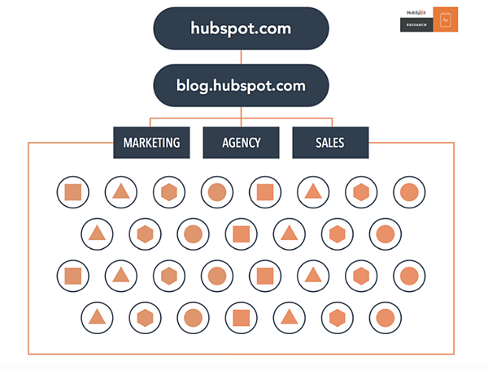
Here’s what our blog architecture used to look like using this old playbook:
Now, in order to rank in search and best answer the new types of queries searchers are submitting, the solution is the topic cluster model.
For this model to work, choose the broad topics for which you want to rank. Then, create content based on specific keywords related to that topic that all link to each other to establish broader search engine authority.
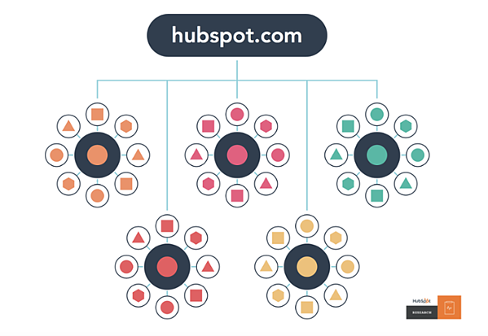
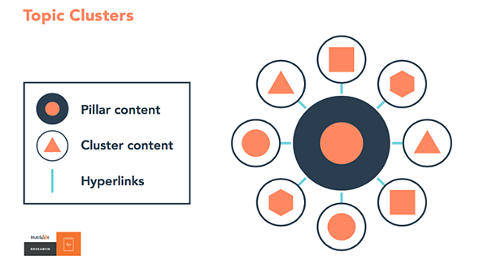
This is what our blog infrastructure looks like now, with the topic cluster model. Specific topics are surrounded by blog posts related to the greater topic, connected to other URLs in the cluster via hyperlinks:
This model uses a more deliberate site architecture to organize and link URLs together to help more pages on your site rank in Google — and to help searchers find information on your site more easily. This architecture consists of three components — pillar content, cluster content, and hyperlinks:
We know this is a fairly new concept, so for more details, check out our research on the topic, take our SEO training or watch the video below.
11. Publish evergreen content.
When planning and writing your blog articles, ensure it’s evergreen content. Meaning, the content is about topics that will remain relevant and valuable over a long period of time (with only minor changes or updates). Let’s look at a few reasons why evergreen content is so important:
It’ll help you rank over time, not just in the near future.
It contributes to steady amounts of traffic coming to your blog (and website) long after it’s been published.
It’ll help you generate leads over time as a result of the traffic it continually generates.
All blog content — whether it’s a long-form article, how-to guide, FAQ, tutorial, and so on — should be evergreen. Even the images you use in these posts should be evergreen. Check out this blog post for some examples of and ideas for evergreen content on your blog.
12. Update existing content.
To improve your SEO, you may assume you need to create new blog content. Although that’s partially true, you should also focus a great deal of your time and energy on your existing blog content. Specifically, repurposing and updating your current content, as well as removing your outdated content.
This is because it takes a lot longer for a completely new piece of content to settle on the search engine results page (SERP) and gain authority, whereas you could update a piece of content and reap the benefits fairly immediately in comparison.
Not only will your updated content rank on the SERP faster, improving your number of visitors and leads, it also takes a lot less time and fewer resources to update an existing piece of content rather than create a brand new article.
Additionally, updating and repurposing some of your most successful pieces of content extends its lifespan so you can achieve the best results over a longer period of time (especially if it’s evergreen content).
The final step entails removing your outdated content that’s no longer relevant to your audience. Although your goal is to ensure your content is evergreen, some of it is bound to become outdated over time. This includes statistics, product information (if you have any listed in your blogs — as your products and business evolve), or information that changes across your industry over time.
Create Blog Content Your Readers (And Search Engines) Will Love
We don’t expect you to incorporate each of these blogging SEO best practices into your content strategy right away. But, as your website grows, so should your goals on search engines. Once you identify the goals and intent of your ideal readers, you’ll be on track to deliver relevant content that will climb the ranks of the SERP.
We're Here to Help.
Give us a call today. We’re ready to answer your questions.