Discovery for Businesses & Startups: Stage of Exploration

Discovery for Businesses

Reduce uncertainty about WHO your customers are and WHAT they need — and ensure you’re building the RIGHT PRODUCT/SERVICE for them.

Credit: Alex Covic

Product discovery is a critical stage in the life of any startup or new corporate venture. Without discovery, you have no way to prove or disprove assumptions about your customers. Without that, there’s a significant chance that you’re basing your product decisions on wrong assumptions.

As a consequence, you may waste time building features, products, or services nobody needs. And that usually takes more time and resources than you would invest to discover the right ones.

Research is not Discovery

“There are no facts inside the building so get the heck outside.” — Steve Blank

If you’re obtaining information from already available “secondary” sources you’re doing desktop research. That can tell you stuff about the size of the market, competition, pricing.

That’s helpful to determine the viability of the idea in the broad sense.

Discovery for Businesses

But the information you can get from case studies and reports will always be someone’s interpretation of actual data. While that can be useful, it may or may not apply in your specific context.

Outside the right context, secondary research won’t tell you what your users actually need. It can’t help you discover if the idea is desirable.

YCombinator tells its founders that early-stage startups have two jobs: writing code and talking to users.

Yet, there’s a tendency for organizations to neglect or even completely skip Discovery — even when developing new products or aiming for new customer segments.

Many founders and product leaders spend less than 5–10% of the resources and time to learn about their users. In contrast, most product professionals I’ve spoken to agree that developing a Minimum Viable Product (MVP) will require 25–35% of the product leader’s time spent on Discovery.

If we all know that there’s no innovation without exploration, why don’t we do it?

We don’t like being wrong

Exploring is moving through the unknown territory without a map. There will be missteps. Yet, no one likes being wrong or having their ideas second-guessed — especially inside a meeting room.

The culture inside many organizations is still set up around the execution of a known business plan — and as such, discourages “not knowing”.

On a personal level, it can be very unpleasant to discover how much of what we think we know we actually don’t. And discovery will uncover how much of what we hold as facts are wishful thinking or a huge leap from the conclusions of whichever report was at hand.

Validation is not Discovery

Founders and corporate leaders are often future-focused & goal-directed. We tend to focus more on the solutions and how they will impact the future than the existing problems.

business discovery

No-one likes not knowing stuff, especially inside a meeting room.

That mindset is probably one of the things that make innovators innovative and most definitely good to have in life. But being too focused on your solution when you should be thinking about the problem puts you in confirm mode when you should be in the learning mode.

If you go in discovery looking to “validate” your product idea, the whole effort becomes a yes/no question — your solution either works or it doesn’t.

And if you invest in developing the MVP without discovery, you are really making a significant bet on the positive answer.

Validation is a yes/no question, while Discovery should be an open-ended conversation.

Open-ended conversations allow you to learn what you don’t know, not only prove or disprove what you think you do.

Worse yet, falling in love with a solution sets you up to fall victim to one of the myriad cognitive biases homo sapiens are susceptible to.

Our minds do play tricks on us

Evolution selects for Energy Conservation, and the brain needs a lot of energy — more than 470 Calories per day). To save on gas, the brain has developed a series of heuristics. These are mental shortcuts or information-processing rules that enable the brain to make quick estimates about the possibility of uncertain occurrences.

image 119

The code is still a bit buggy. Photo by Natasha Connell on Unsplash

These are simple and quick for the brain to compute and right often. They are also error-prone and can induce “severe and systematic errors” when applied in the wrong context. That leads to wrong interpretations, mistakes in judgment, and general “irrationality”.

We all do it.

One common cognitive bias is the recency heuristic. That’s the phenomenon of a person remembering something that has happened recently better than something that has happened a while back.

That’s obviously useful when you need to remember where you put your keys last night. But putting too much emphasis on the most recent bit of information can lead you to wrong conclusions.

Similarly, humans tend to rely on immediate examples. Often the ones that are easiest to find, or the first to come to mind when evaluating a specific topic or decision.

Scientists call this the availability heuristic and we do it every time we use the facts which are at hand as the Single Source of Truth.

So maybe that Gartner report that’s been on your desktop for a few months isn’t the best source of information.

My favorite? The confirmation bias. That’s the name for our tendency to favor information that confirms our existing beliefs and biases.

So let’s say you believe left-handed people are more creative and happen to meet a left-handed artist.

Just another left-handed artist.

Your brain will remember this occurrence as important, further confirming its existing belief. And the next time you encounter a left-handed person, you will expect them to be, and maybe even perceive them as creative.

So what can we do about this?

How to think like an Explorer

The easiest way to get into the Discovery mindset is to start focusing on the problem, not the solution.

Starting Product Discovery with a solution in mind is like playing darts in a dark room. You’ll eventually hit the dartboard, but it will usually take a lot of darts.

image 120

Maybe you’ll get lucky and hit a unicorn.

Starting with the problem doesn’t necessarily turn the lights on, but it will tell you in which direction to throw.

Customer/Problem Hypothesis

One of the tools I use to help founders fall in love with a problem & embrace uncertainty is the Customer/Problem Hypothesis.

Customer/Problem Hypotheses are simple statements about who our customer is and what they are trying to accomplish.

These can take any form you’re comfortable with (Scenario, User Story, etc). I personally like to use the following format:

When _____ , I want to _____ , so I can _____ .

“When I’m traveling, I want to stay close to laptop-friendly cafes so I can do my work.”

“When shopping for groceries, I want to buy organic produce so I can feel good about myself.”

The situation, Motivation, Desired outcome.

Contrast this with your typical User Story format:

As a _____, I want to _____, so I can _____.

Persona, Motivation, Desired outcome.

If you’re familiar with the Jobs to be Done theory this approach will not be new.

I like this format better than conventional User Stories because it defines the user in a situational context, rather than as an intersection of demographic categories.

It provides context for the problem and in the research context is king.

There are however situations where User stories might be more suited for the job — like when the user’s demographic has more to do with the problem that the context it’s coming up in.

Map out your assumptions

The Value Proposition & Business Model canvases are probably the first tools intrapreneurs and entrepreneurs will learn and use to think through and define the most important components of their offering.

image 121

The Value Proposition Canvas can help you think about your customer, their needs, problems, and benefits they desire from a solution.

The Business Model Canvas takes a wider view. Apart from your customer and your solution, BMC makes you think about the market, the actions you need to take, the resources you need to put in.

Both are great tools with many use cases. I use them to map what we know and discover what we don’t about our business, customers, and market.

Use your tools as a way to pose questions, not assume answers.

You can do this as a group exercise with your team or clients. Get together, put up a canvas and get some Post-It action going. Once you fill up the canvas with statements, go through them one by one and ask yourself and your team:

  • How do we know this is true?
  • Can we even answer this question?
  • Where’s the evidence for this?
  • What’s the source of this knowledge?
image 122

Discovery is a team sport.

If you’re like most early-stage teams, you’ll find that you lack real proof for many of your assumptions.

Often, if there is evidence it’s circumstantial and open to interpretation (as secondary research tends to be).

This doesn’t always come easy. But teams that are honest with themselves find that this exercise forces teams into action by shaking the status quo.

Better yet, it turns a bunch of assumptions we took for granted into a list of questions that can be answered.

Some guesses are bigger than others.

Once you take inventory of what you know you need a way to decide what questions you need to ask next. Fortunately, not every assumption can make or break your business. Some are critical leaps of faith that everything revolves around. Others might be less impactful, or will matter at some point in the future but don’t right now.

We need a way to rank these by the degree of certainty we have in a hypothesis and how much impact it has on our business.

At untangle digital, we use a simple Impact/Certainty Matrix to help founders decide what to focus product discovery on.

Impact/Certainty Matrix

Much like the Impact/Effort Matrix we use in Product Development to prioritize product feature requests and decide what to focus on next, an Impact/Certainty Matrix is a tool that helps you decide which hypothesis you should test next.

Stuff with more impact has precedence over stuff with less. And those of lower certainty are riskier.

The lower right corner is where you should focus. That’s your “Leap of Faith” zone.

Your users are the ultimate source of truth.

Once you know what your Leaps of Faith are, you need a way to remove some of that uncertainty and risk.

Once again, context is king and the approach that works for one set of assumptions and users won’t always work in other contexts. At untangle digital, we developed (and appropriated) an array of tools and techniques to help founders discover & validate facts about their businesses. But our bread and butter are customer discovery interviews — and they should be yours too.

Everything you need to do Product Discovery.

Interviews beat surveys because they allow you to ask open-ended questions and thus find out stuff you didn’t know you don’t know. Surveys don’t allow you to read non-verbal cues and make leading questions almost impossible to avoid.

Even if you’re pressed for time interviews are the way to go. With each interview, you still get insights you can use immediately. With anything that requires more work, you only get insights at the end of the process.

Even if you only did 2 interviews today, you’d still have more actionable insights today than any survey that would take 2–6 weeks to complete.

Your customer’s words are gold. They are the ultimate source of truth about their needs & goals. You can use them to direct your product decisions, market positioning, pricing, and channels.

The trick is to get to the right words.

Getting Actionable Facts

If Henry Ford asked the users what they want, they would ask for faster horses — or at least that’s how the apocryphal goes.

Ford may not have said that, but his point stands. Humans can be very inaccurate with their memories, often not aware of their motivations & notoriously optimistic about their future.

They will even tell you what they think you want to hear just to make the interaction pleasant.

To avoid getting led astray by your customer’s words, here are a few rules of thumb I use:

Ask for help, not an “interview”

If you approach your customer conversations as “interviews”, there’s a big chance your response rates will plummet. Establishing an interviewer/interviewee dynamic will often make your users less open and willing to share.

And you might discover that the users who do respond will do it only for the incentive.

Instead, ask for help. Reach out to people in your network who fit your customer profile or can introduce you to people who do. Tell them you’re working on a project (without describing the product — we don’t want to bias them). Tell them they can help you and ask for 20 minutes of their time.

You’ll be surprised how likely users are to help when being asked for help, not being sold to, and not feeling under examination.

image 123

Everybody likes free coffee and being listened to.

Talk about their past, not your future.

Ask your users about facts about their life, not their opinions about the future.

Humans are biased and optimistic. What they think they know can be wrong. They can change their mind. If you put them on the spot, they might come up with an opinion they don’t really hold just to “play along”.

So, it’s better to ask:

“How much did you pay for those shoes?”

than:

“How much would you pay for a pair of shoes?”

One has happened, the other hasn’t. One is a fact, the other is an opinion.

It’s better to be shown than told

This one’s easy — If you have an opportunity to observe the user trying to accomplish their goal in the appropriate context, take it.

You might discover goals and obstacles even your users aren’t aware of.

Mach 1 Digital helps startups and corporate ventures launch new products and services with a focus on using digital platforms to gain valuable discovery, Business Modeling, Lean Startup processes, and Running Lean principles. Mach 1 Design executes “Rendanheyi” or Zero Distance to the Customer. Connect with [email protected] for a free consultation or call us at (469) 536-8478

We Analyzed 50,000 Social Media Posts from the Last 12 Months to Learn How to Get More Organic Traffic. Here’s What We Found.

Social Media posts

To figure out how to get more organic traffic, we looked over 50,000 social media posts from the previous 12 months. Here’s What We Discovered. We Analyzed 50,000 Social Media Posts from the Previous 12 Months. Here’s What We Discovered.

Facebook, Instagram, LinkedIn, Pinterest, and every other social media platform you can think of all do the same thing at some point.

Are you able to figure out what it is?

Their algorithms are tweaked to reduce reach and sharing. That implies unless you start promoting, you won’t get as much visitors from them.

But, even with their algorithm adjustments, surely there’s a way to garner the most traffic from each social network?

To discover out, we looked at over 50,000 social media posts from 10 different industries that shared material.

The postings reviewed were some of the most shared on Facebook, Twitter, and Pinterest in the previous 12 months and included a link to industry-related content, according to BuzzSumo. We couldn’t acquire enough information from other social media platforms.

Which industries did we investigate?

Despite the fact that there are other industries, we concentrated on the following ten, which accounted for the majority of posts and social media activity. This allowed us to give more information about how to increase organic social traffic.

The following are the ten industries that we investigated:

• Business

• E-commerce

• Fashion

• Food

• Health

  • News

• Politics

• Sports

• Technology

• Travel

Social Media Engagement in Each Industry Over the Last 12 Months (Analysis #1)

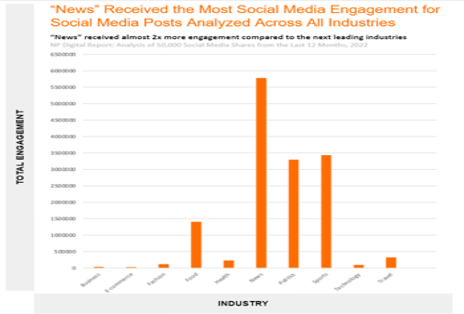
The first graph illustrates the total social media interaction for each industry’s content over the last 12 months. This is the grand total, not the average for the month.

image 126

The most engaging posts were those connected to the news, followed by sports, and finally politics.

It’s worth noticing that business and e-commerce-related social media posts garnered almost little engagement, which could indicate some trends in both areas.

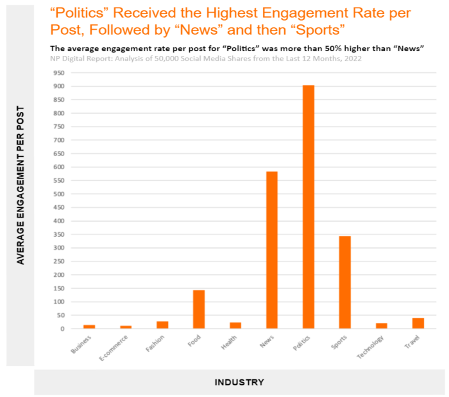
We looked at the average engagement statistics for each article rather than the total to ensure the data wasn’t distorted or biased.

image 127

For the most part, the outcomes were comparable, but there was one notable exception. Even though News received the greatest total social media engagement, when it came to average engagement per post, Politics came in second.

But, as everyone knows, politics should not be discussed at the dinner table. To put it another way, you don’t want to divide your audience.

Including news-related topics in your content, regardless of your business, could be a terrific approach to increase engagement and traffic.

If you own a music-related website, for example, you might try to break news or post about it in your blog, such as when Apple bought Beats by Dre a few years ago. If the deal happened today, Apple would make sure to cover it on their blog and then promote it on their social media channels to increase engagement.

If you were a business-related website, you could talk about the Beats by Dre acquisition from your point of view. Even if you aren’t the first to mention it, you may explain why they made the decision and provide your top five forecasts for the following five years.

Let’s imagine you’re the owner of a travel-related website. You might discuss the quarantining limits that each country has and how they are altered on a monthly or even weekly basis.

There are always possibilities to tie in the news, which can lead to greater social engagement and more organic traffic to your website, regardless of what business you’re in.

Analysis #2: What Type of Content Works Best on Social Media Networks?

What Kind of Content Performs Best on Social Media Networks?

We also looked at which industries had the most shares on each social network just for fun.

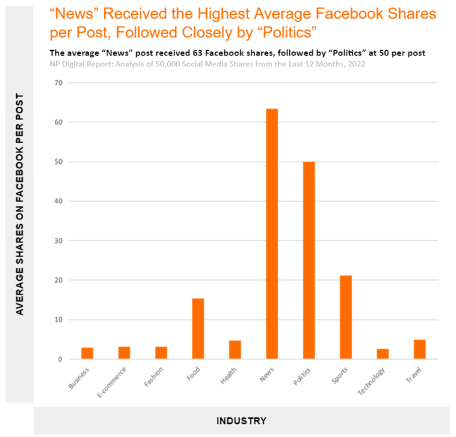
The following are the average Facebook shares for each industry:

image 128

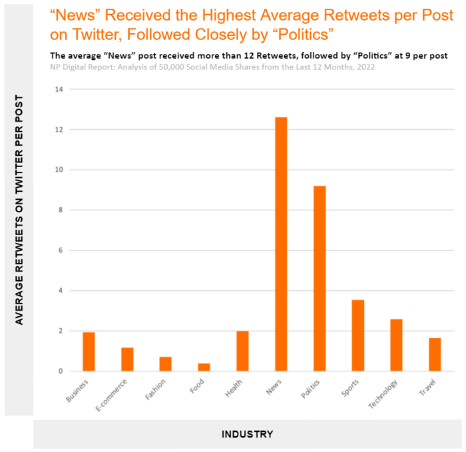
And here is what the data looks like for Twitter.

image 129

And Pinterest… It should come as no surprise that news-related content is preferred on Facebook and Twitter. Pinterest, on the other hand, favors visual material, therefore businesses like fashion, travel and even food fared better.

Find ways to tie in News-related themes or events to your content, as I discussed earlier if you want to attract more traffic from Facebook and Twitter. It can help you gain traction even if you aren’t in the industry.

However, if you want to increase your Pinterest traffic, concentrate on visual content.

None of this is very eye-opening. So we dug a little deeper to find what kind of material was most popular on these sites. Infographics, I believe, would perform best because they are easy to share and generate links to.

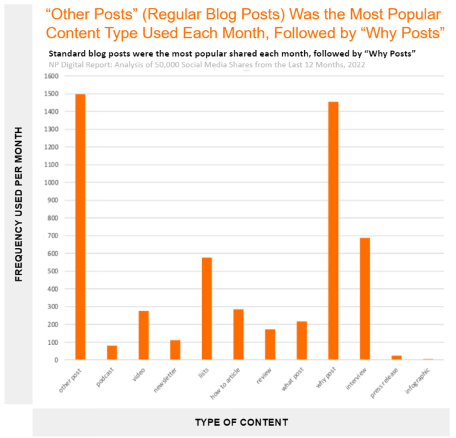
image 130

Surprisingly, infographics performed the worst in terms of social media engagement.

On the other hand, I never expected “why” blogs and “interview”-based posts to perform so well.

Everyone loves lists like “The 7 advantages of green tea,” so list-based material is almost a given.

Consider topics like “why isn’t there an eclipse every month” or “why don’t people wear white after Labor Day” when considering the attraction of why-based postings. People like to hear from people who interest them in interviews. For example, if you were able to secure an interview with corporate leaders such as Elon Musk or Jeff Bezos, athletes such as LeBron James or Cristiano Ronaldo, or even political figures who are currently trending, you can bet it would receive a lot of social shares.

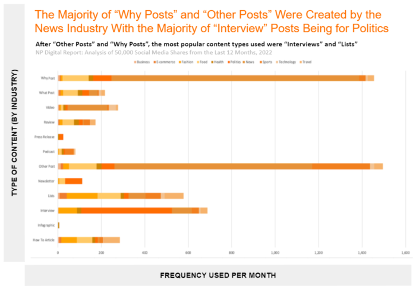
image 131

The graph above illustrates which content type was used the most by each industry, in case you were curious. You can see how the news industry produces a lot of why-related content, but other businesses, such as business and e-commerce, do not.

You may utilize this information to identify gaps and capitalize on the content types that are most likely to drive visitors to your industry.

Analysis #3: The Relationship Between Total Engagement and Total Shares of Each Industry

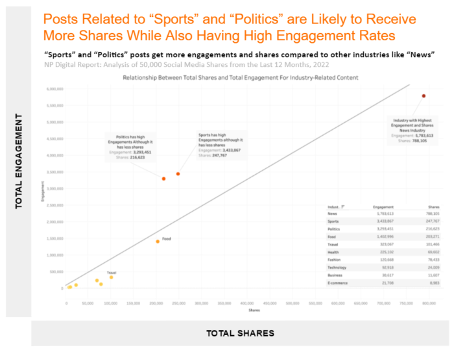
Some content is widely shared, while others receive a lot of interaction in the form of comments and likes. However, just because a piece of content receives a lot of comments doesn’t indicate people like it and want to share it with their friends. The more shares a piece of content receives, the more likely it is to receive more traffic.

image 132

This is plainly shown in the graph above for each industry. If you publish contentious content, such as political or sports-related content with a large number of ardent supporters and detractors, engagement alone will not result in increased traffic (it can but not always).

For example, suppose I wrote an article about “Why the Los Angeles Lakers Will Win the NBA Championship.” People who support any of the other 29 NBA teams will scream at me about how I’m wrong and how their club has a better chance of winning.

Social media engagement is excellent, but it can only go you so far. That is why the purpose of this research is to determine how to use social media sites to generate more organic traffic to your website rather than just “interaction.”News clearly is the winner on both fronts if you look at the chart above. So, again, try to tie it into your content wherever possible.

If you look at the graph above, you can see that news is obviously the victor on both fronts. So, whenever feasible, attempt to incorporate it into your material.

Analysis #4: How Long Should Your Content Be And When Should You Share It?

We thought it would be interesting to look at how long your articles should be and when you should share them to receive the greatest social traffic for the following analysis.

Did you know that the average article on Google’s first page has 1,447 words?

It used to be around 3,000 words, then dropped to the low 2,000s, and today stands at 1,447.

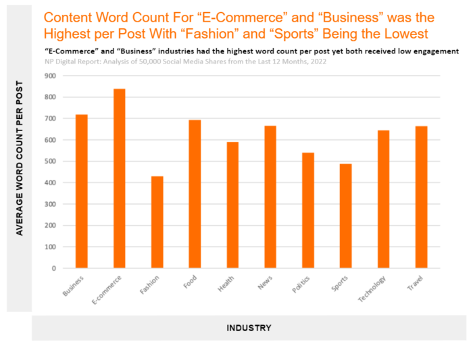
We wanted to see how lengthy content should be on social media to get the most shares. Let’s start with the average word count per industry for the 50,000 most shared articles.

image 133

They are, as you can see, quite short. Extremely brief (700 words or less for most industries).

Most words were found in the categories of e-commerce and business. However, according to the previous figures I showed, both of these industries had the lowest number of total engagements and total shares.

Despite the fact that Google favors long-form publications, users on social media prefer shorter posts. When looking at the articles that people like to share (not like, but share), it’s evident that they prefer shorter articles.

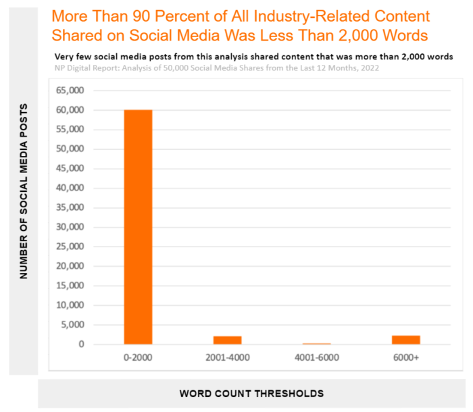
image 134

In this study, more than 90% of all content items posted on social media were fewer than 2,000 words long.

It’s much more difficult to get someone to actively share an item than it is to merely click the “like” button. Keep in mind that the same article might be shared several times.

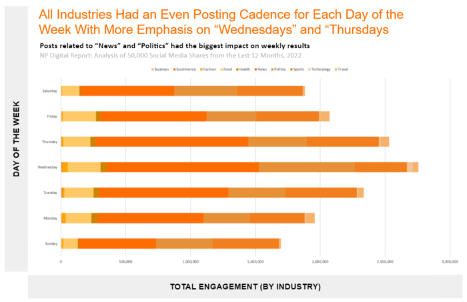
When it comes to releasing and promoting your content, not every day is the same. It also differs depending on the industry.

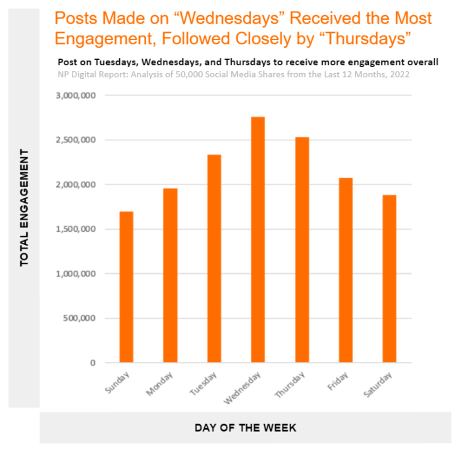
image 135

Wednesdays are the most popular days for consumers to engage with the material, followed by Thursdays and Tuesdays.

It isn’t that straightforward, though. Because each sector is distinct, releasing content on Wednesday will not guarantee success.

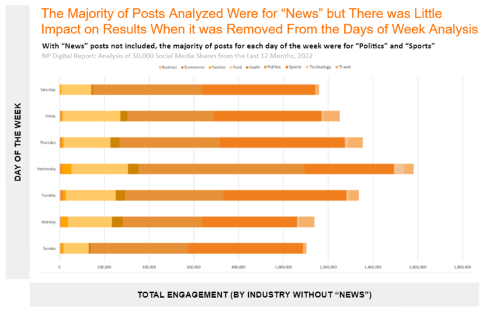
image 136

I understand that the graph above is difficult to read because News dominates the results. As a result, here’s a version without News.

image 137

If you’re in the “Food” industry, you can advertise your material on Wednesday, but you’ll also do well on Friday, despite the fact that other industries don’t work as well on that day.

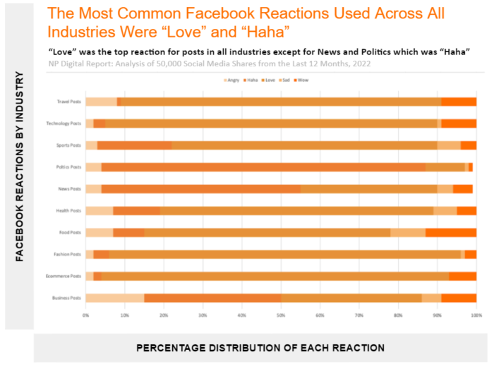
Analysis #5: Most Common Type of Facebook Reaction for Each Industry

We were able to pull the most popular Facebook reactions for this one, which was a lot of fun.

image 138

The type of Facebook reaction (Angry, Haha, Love, Sad, Wow) that people had for postings relating to each industry is depicted in this graph. Facebook responses are the platform’s next generation of “likes.”

The significant conclusion is that “Haha” and “Love” were the two most frequent sorts of reply across all industries.

“Love” was the most popular reaction across all industries, with the exception of news and politics, where “Haha” was the most popular reaction.

Create content that transmits the emotion of “love” or makes people giggle if you want your content to succeed. Those are the two types of responses that people are most eager to offer.

Conclusion

The charts above revealed a number of intriguing insights.

If you want to succeed on social media, the most important takeaway for me was to generate why-based content and write short pieces.

In general, you should:

• connect content to current events

• write content that explains why things are the way they are, or conduct interviews with well-known people

• Instead of 2,000+ word articles, produce shorter postings of 700 words or less to publish on social media.

• To gain the highest attention, advertise your content on Wednesday (for most industries).

• generate content that appeals to people’s emotions of love or laughter

If you would like help designing and generating regular social media posting with high-quality graphics and ad-copy, content Mach 1 Design to get our annualized automated daily posting service and build social media consensus about your company. Social proof is coveted by millennials and Google for SERP ranking. Contact [email protected] or call (469) 536-8478

Why Build a Digital Platform?

why build a Digital Platform

Today, communication is almost completely through digital channels. To have a visible and findable presence in the marketplace, a digital platform must be present that fits the various stages of the customer journey. McKinsey & Company reports that digital platforms and ecosystems define the new competition. The leading competitors in any industry are now “Tech first” and have vibrant and aggressive digital platforms or ecosystems.

Digital platforms and ecosystems have become an essential part of the business landscape and are no longer the domain of only digital natives. Today, digital platforms satisfy a continuum of needs, from automobile insurance and real estate services to advice from doctors. In large part, even individuals now communicate via a digital platform to digital platform on sites like Facebook and online dating sites. But merely building a website is not what a digital platform or ecosystem is about. It is much more. McKinsey in their 2018 survey of 1600 C-suite executives found 5-year EBIT growth of 2.2% and 10% beyond. Companies surveyed by McKinsey with digital platforms had annual EBIT earnings boosts of 1.4% which outpaced non-digital platform companies by 1.1 % or nearly 4.5 times greater growth. Across products, sectors, and developed economies, McKinsey found that a single digital platform prevails 75% of the time.

Build a Digital Platform

Not surprisingly, the top reasons these digital platforms thrive are connected to network and scale effects, in tandem with the desire to secure end-to-end digital services. Moreover, the customer journey of the largest purchasing power groups of consumers demands an online digital presence to do business. Further, the digital native consumers expect thought leader content, expert advice, and customer reviews before they will trust doing business. Most digital active and digitally responsible customers give the rationale that they use digital platforms to make it possible to combine individual services and integrate them into full-service offerings.

Further, digitally active companies cite their digital platform presence in terms of their desire to develop a bigger base of customers across categories at scale. In the competitive business environment, with spreading digital platforms and ecosystems, and expanding networking effects-speed of first-mover advantages and winner take all dynamics will continue to become even more important for incumbents to consider and ultimately demand competitive digital platforms and ecosystems.

digital platfrom

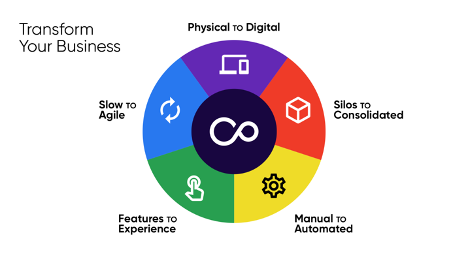
As technology continues to revolutionize the market strategy of modern business, companies including startups are leveraging the digital platform and ecosystem to encompass the new shifts in customer interaction. Most responsible companies and startups are recognizing the necessity to establish digital platforms so they can integrate them into their business models to reach out to new customers and new marketplaces.

image 114

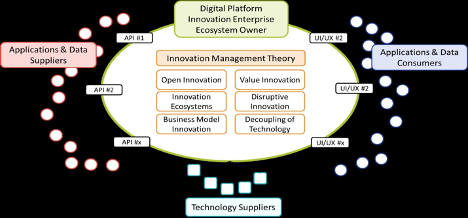
A digital platform consists of multiple services, representing a unique combination of software and hardware services a company utilizes to deliver its digital strategy. Digital platform strategies are one of the fastest-growing markets. Digital platforms help businesses enhance user experience in order to attract new customers. The evolution of advanced technologies such as IoT, AI, Cloud, and analytics are playing a crucial role in driving the growth of the digital platform market. McKinsey’s survey strongly indicates new evidence for the power of digital platforms and suggests it is a winning operation model for digital strategy. A digital platform is the unique collection of tools and services an organization uses to deliver its digital strategy. Another way to look at a digital platform is it is a business model that allows multiple participants (producers and consumers) to connect to it, interact with each other and create and exchange value.

image 115

Benefits of a digital platform are:  generate revenue, reduce costs, foster collaboration and innovation for new products and services, gain speed to put products on the targeted markets. For information and help on developing your digital platform or ecosystem, contact Mach1Design at [email protected] or give us a call at (469) 536-8478

4 Steps To Test Market Demand for a Product You Haven’t Created Yet

Test Market Demand

Credit: Ron Rule

It’s 2:00 a.m. — you’re tired, but you can’t sleep because you just had the most profound idea an inventor could ever have. Your product is going to change the world and millions of people will buy it. You’re sure of it!

Then reality sets in.

Coming up with an idea was the easy part. Now you have to figure out how to actually make the thing. And once the high of being the person who thought of the next big thing starts to wear off, you realize that if you’re being honest, you don’t really know if people will actually buy it yet. So how do you find out for sure?

Do Focus groups Work To Test Market Demands

Focus groups are a nice idea, in theory, but anyone whose been in the consumer products space for any length of time will tell you there’s one big problem with them: they don’t work. What people say they will buy and what people actually buy are usually miles apart. The problem with things like focus groups, surveys, pre-registrations, and similar endeavors that attempt to gauge pre-market demand is that they’re always based on a logical problem/solution setting. Asking someone “Would you buy this?” when they know it isn’t available yet results in them thinking about it logically instead of emotionally. They’re viewing the item as something they might consider down the road. That isn’t a real commitment — thinking about it for later doesn’t mean they would actually hand you a fist full of cash for it right now.

I stopped bothering with non-committal feedback for new products about a decade ago. We launched a lot of products that failed after survey data indicated they would be a hit. We passed on a certain “blanket with sleeves” after all of the focus group and survey results viewed it unfavorably — another company took it on and ended up selling more than 30 million units.

At the end of the day, the data never matched real-world behavior when respondents didn’t have any skin in the game.

So How to Test Market Demand?

The only way to truly do market demand testing is to know if someone is going to fork over their hard-earned cash to buy your product is to get it in front of them. Traditionally, that meant you would need to create a prototype, spend a good bit of time testing and refining it, and eventually manufacture a small quantity. Unfortunately, this was the most expensive way to learn that people weren’t going to buy it.

But that was the old way. Today, we use a whole new method of testing market demand — and it’s so simple, you’ll wonder why you didn’t think of it yourself before reading this. Here’s the process I currently use whenever I want to field test a new idea, without spending one cent on product development.

1. Create Your Brand Identity

The first step is to come up with a name and logo. It doesn’t actually have to be permanent or your final choice, it just has to be unique enough to not be confused with anything else that’s already on the market. Go ahead and register the .com version of your brand as a domain name — I strongly recommend getting the .com over other TLDs. If it’s not available, try prefixing it with words like “buy” or “get.”

2. Photoshop Your Product Concept

Have someone who knows what they’re doing in Photoshop create images of what your product would look like. You’ll need a few stand-alone product shots (product on white or transparent background) and some lifestyle shots showing your product being held by users or displayed in its intended settings. You can find plenty of people to do this for you on Fiverr.

3. Create an eCommerce Website

I usually recommend using Shopify, but if you’re more comfortable with WordPress you can use an eCommerce plugin like WooCommerce. If you aren’t particularly web-savvy, you can find plenty of people on Fiverr who can help you set things up. Simple, minimalist templates are best (and usually free). Leave your payment processing in Test Mode — Your goal with this website is to present your product as though it already exists and is available for sale right now. You want people to be able to add your product to the cart and check out as if they were really buying it. The difference is that since your processor is in test mode, you aren’t actually charging their credit card.

4. Drive Traffic With Email and Facebook Ads

If you’ve finished the above steps, you now have a website for a product, with great photos and a fully functional checkout, which people can buy (even though you secretly aren’t actually charging them). Now it’s time to get some traffic to it and see what happens. If you have an email list you can blast it out to, go ahead and start with that. Otherwise, the best way to test your product’s conversion rate is through Facebook ads. Create a Facebook page for your brand, create an ad for your product, and promote it. Personally, I would spend around $10,000 on a proper marketing test, but you can start with a lot less if you aren’t comfortable going that high right away. I do recommend spending at least $1,000 because you want to get enough clicks and conversions for the data to mean something — trust me, it’s a heck of a lot cheaper to lose $1,000 on testing market demand than it is to lose tens or hundreds of thousands of dollars producing a product nobody wants.

When your marketing test is completed, you’ll have a few important figures:

  1. How much traffic did your site receive?
  2. How many sales did you get?
  3. What was your site’s conversion rate?
  4. What was your cost per acquisition?
  5. What sort of comments did people make on your ad?

Now it’s just a matter of digesting those numbers. Usually, marketing tests aren’t “profitable,” so don’t worry so much about the CPAs — in a proper marketing campaign, you would be refining your audience to get those down anyway. It does give you an idea of what you would be working with out of the gate so it’s something to keep in mind.

At this point, you can shut down the website and Facebook page so no additional “orders” come through. It isn’t necessary (or recommended) to reach out to the people who ordered and let them know it was a test. Since you never actually charged anyone’s credit cards, they haven’t made a purchase.

Main Takeaway From How to Test Market Demand

The main takeaway here is to gauge whether or not there’s at least some demand for your product concept, and the Market it as if it were real test is the best way to get those answers. A person who typed in their card number, believing they would be charged, made a real commitment to buying your product. Knowing how many people will do that is way more valuable than any survey or focus group. Best of all, you’ll probably have quite a few comments on your Facebook ad too. If your first ad doesn’t do well, that might give you an idea of what they didn’t like — that means you can go back to the drawing board, make a few changes, and test again until you find a winner. Contact a marketing agency to see how we can help you with your testing your products market demand and marketing your brand new products or email us at [email protected]

The Ultimate Guide to Google Maps Marketing

Google Maps Marketing

Everyone has their favorite Google app, and mine is – without a doubt – Google Maps. Sure, Google Now is incredibly impressive (and getting better all the time, thanks to Google’s artificial intelligence, RankBrain), but Maps is one of the apps that Google has spent the most time refining and improving, and the results speak for themselves

Although I pride myself on my strong natural sense of direction, I use Google Maps all the time. Where would we be without Google’s omnipresent GPS data to guide us? Probably driving off cliffs or getting lost in fields, if Apple’s attempts to match Google Maps is any indication (yes, I know, it’s better than it was, but it’s still terrible). Google Maps is undoubtedly one of the most useful tools Google has given to the world, but it’s much more than a means of getting around without resorting to folding paper maps (bad) or asking people for directions (worse) – it’s an incredibly powerful marketing tool.

In this post, I’ll walk you through how digital marketers can – and should – be using Google Maps marketing as part of their wider digital marketing strategies. We’ll cover essential features and things you absolutely must be doing, as well as some nifty, lesser-known tips and tricks to help your customers find you.

What Is Google Maps Marketing?

In a nutshell, Google Maps marketing is the process of using Google Maps’ functionality to make your business easier to find. Although this can be very useful (and expected) for large companies, it’s even more indispensable for smaller businesses. However, Google Maps marketing isn’t just about visibility – it’s about positioning and not just that of your store. If used correctly (and strategically), Google Maps can play an important part in your digital marketing strategy.

What’s the Point of Google Maps Marketing?

The ultimate objective of Google Maps marketing is not just to rank higher on Google Maps, but also to achieve as high a placement as possible in the local business results listings on relevant Google search engine results pages. Let’s take a look at what this means.

Proximity Based Google Maps Results

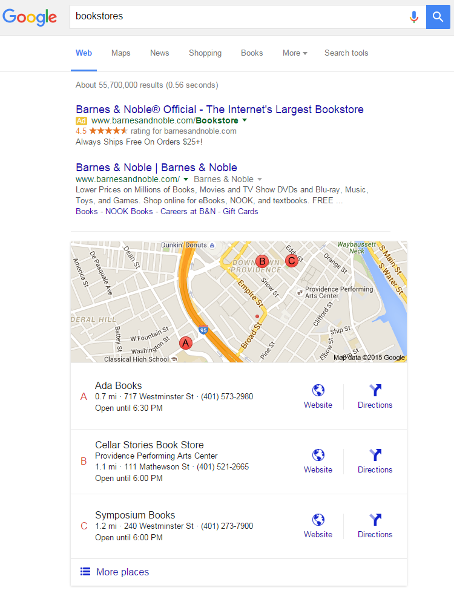
The first type of Google Maps listing is based on your physical location. With mobile search volume increasing, this type of search (and Google Maps result) is becoming much more common. If you’ve ever performed a search for a specific type of business from your mobile device, you’ll almost undoubtedly have come across a result like this:

Proximity Based Google Maps Results

In the example above, I performed a search for “bookstores” and received these results. As you can see, Barnes & Noble has the top spot thanks to its PPC ad, as well as the top organic result (whether this is a result of high search volume, canny SEO, or a rapidly dwindling corporate bookstore market is anyone’s guess). However, the Maps results are what we’re really interested in.

Similar to the way PPC ads are subject to the ad rank formula and assigned ad positions based on that formula, Google Maps listings are prioritized into positions based on the user’s location, with position “A” being the closest and most prominent. Positions “B” and “C” are also provided, in case I want more options.

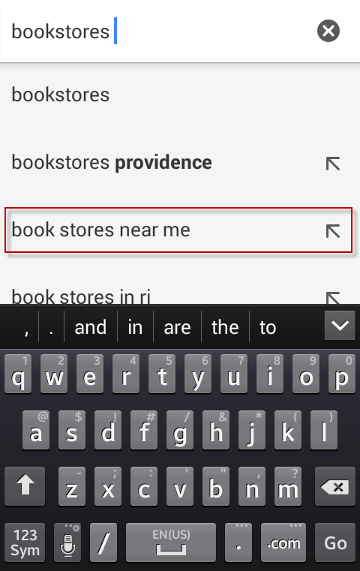
You may have experienced results like this yourself. Many mobile users are prompted to search for businesses near them thanks to Google Suggest, especially when searching from their mobile device. The screenshot below shows the same search performed on my Android device with location data tracking enabled:

Proximity GMB

Depending on a number of variables, some searchers may find that predictive “near me” results are even more prominent than they are in this example. It’s almost as if Google wants us to use Maps to find local businesses!

Ranked Google Maps Results

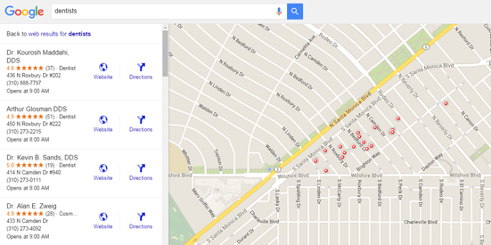
Although proximity-based Maps results are common, they’re not the only type of results offered by Google Maps. Not every user has location data enabled on their mobile device, and Maps listings are available for virtually any destination on the planet, not only those in the user’s general vicinity. This is when “ranked” Google Maps results are often shown. These results appear on Google Maps searches for businesses of a certain type in a given location. For example, in the figure below, you’ll see Maps results for “dentists” in Beverly Hills, California:

Google Maps Results

As you can see, Beverly Hills is particularly well-served when it comes to dental practitioners (got to keep those pearly whites as white as can be for the cameras, after all), which makes it a highly competitive market for Google Maps marketing results. At the top of the list is Dr. Kourosh Maddahi, who owns a dental practice on North Roxbury Drive that has an average patient rating of 4.8 out of five stars from 37 Google reviews.

Here’s where the “marketing” part of Google Maps marketing comes into play.

In this search, I looked for businesses on the other side of the country (eliminating any possibility of my location factoring into my results), so Google isn’t showing me results closest to me. If you look at the second-highest result in the example above, you’ll notice that Dr. Arthur Glosman’s dental practice is also located in North Roxbury, but has a slightly higher patient rating of 4.9 out of five based on 51 Google reviews, but this result is ranked below Dr. Maddahi’s practice, so Google isn’t ranking these Maps results purely based on customer ratings, either – so what’s going on? The answer lies in how well-optimized your Google My Business listing is, along with some other factors.

What Is Google My Business?

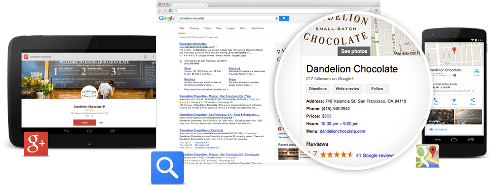
Formerly known as Google Places, Google My Business enables business owners to claim a listing for their business that may appear in Google search results. Virtually any type of business (with the exception of certain more risqué establishments) can claim a Google My Business listing, which will display information that searchers may want to know, such as an address, opening hours, and customer ratings.

Google My Business

Image via Google

Google Maps Marketing Optimization Checklist

Although many businesses claim their Google My Business listing, many simply register their business and provide only the most cursory (or worse, incomplete) information. This, unsurprisingly, results in far less visibility and a poorer overall Google Maps ranking. So what can you do? Here’s a checklist to improve and optimize your Google Maps listing for maximum visibility.

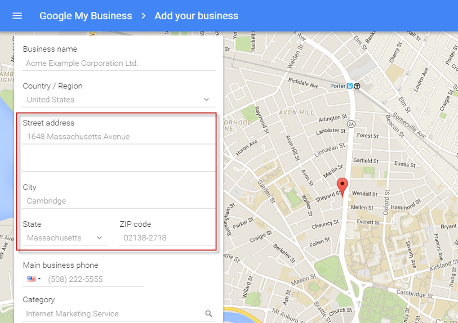
Use Complete, USPS-Approved Address Information

Getting your address right might seem like the easiest part of your Google My Business listing, but you’d be surprised by how many businesses get this wrong.

Google Maps Marketing

When entering your address into your Google My Business profile, ensure that you use the exact same address information used by the USPS (or applicable postal service where your business operates). This includes room, suite, or subdivision information, a full nine-digit zip code, and anything else that makes your business easier to find. Be sure to check for erroneous spaces and other formatting errors, as even slight mistakes in address formatting can interfere with your Google Maps ranking.

Something else to check is that your address is actually being displayed in your Maps listing in the first place. In your Google My Business settings, there is a checkbox that states whether you would like your address information to be displayed. Barring a few exceptions (for matters of customer privacy or safety, for example), this should almost always be checked. The more data you give Google, the more likely you are to rank more highly in Maps results.

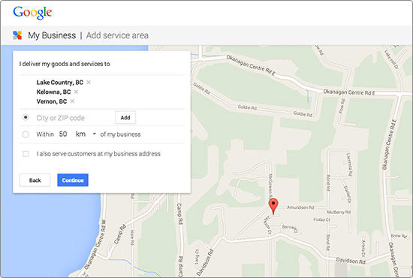
Specify Which Areas You Service

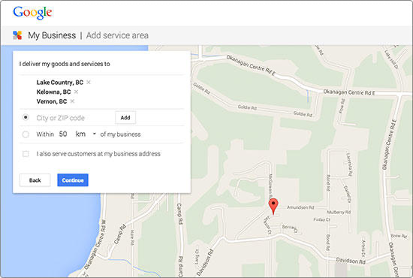
Some businesses have a physical storefront or location but also serve a wider area – think pizza delivery services or package carriers, for example. If this applies to your business, it’s crucial that you state which areas your business services in your Google My Business profile. This could include the names of nearby towns or cities that you serve, or a geographic radius (in miles or kilometers) from your physical location.

image 106

You can (and should) also specify whether you actually serve customers at your business’ primary location. If you do not, you don’t want people turning up at your business expecting to be served when you’re a phone-only company, for example.

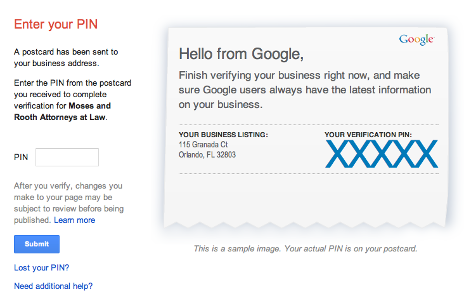
Get Your Google My Business Listing Verified Getting your Google My Business listing verified should be the next item on your to-do list. The verification process can take up to a couple of weeks, as usually Google insists on mailing a postcard with a unique PIN to the physical address listed in your Google My Business profile to confirm verification. Google does allow some businesses to verify ownership via phone.

image 101

Check ALL Categories Relevant to Your Business

Many businesses only state their primary category when creating their Google My Business profile, which is a huge optimization opportunity missed. Although you’re required to list your primary category in order to actually create your Google My Business listing, you can (and should) include additional categories that are relevant to your business.

image 109

This step is especially important if your company offers a wide range of related services. For example, if you run a digital marketing agency, you might set “Internet marketing” as your primary category, and include SEO, PPC, content marketing, email marketing, and social media advertising as additional categories. The more information you provide Google, the more accurate – and optimized – your Google My Business listing will be.

Optimize Your Introduction

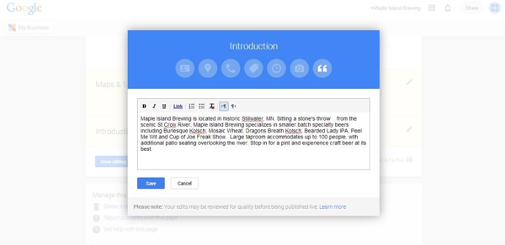
You can think of your Google My Business Introduction as a summary of your company, the products and services you offer, and what sets you apart from the competition. Again, many businesses don’t even bother to take the time to do this, which is another missed optimization opportunity.

image 107

Your Introduction should contain everything a prospective customer might need to know about your business, such as what you do, where you are, and why your business is the best. You can insert links to relevant pages on your site in your Introduction, but be wary of link- and keyword-stuffing. Your Introduction may be subject to Google’s editorial standards, so cramming links and keywords into your Introduction is not only a bad, sleazy, black-hat thing to do, it’ll also probably result in a denial from Google. By all means, use relevant keywords in your Introduction, but take the time to craft a well-written, compelling Introduction written with searchers in mind.

Going back to our digital marketing agency example above, if you offer a wide range of products or services, consider using a bulleted list rather than including them in your copy. This makes it easier to read, which is a best practice that can help your Introduction resonate more strongly with people searching for your business.

Include (and Optimize) Photos in Your Google My Business Listing

Google Maps is an inherently visual platform that goes beyond the maps themselves. Businesses with listings on Google that include photos are much more appealing than those without, which makes your business stand out, but the inclusion of photos can also be an optimization opportunity.

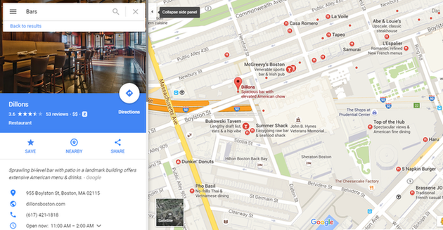
Take a look at this example of a well-optimized listing for Dillons, a bar just around the corner from WordStream’s offices that’s a perennial favorite with our staff:

Google My Business Listing

See how much nicer the listing looks with that crisp, professional image at the top? This makes Dillons look a much more inviting destination than it would be without images. Users can also scroll down the Google Maps listing to see more pictures of your business, which can be crucially important if the ambiance is important to your establishment (as it is with many service-based businesses).

However, including images in your Google My Business listing is about much more than looking pretty – you can also optimize the images themselves to increase your visibility. You can use third-party apps to add metadata to your images, making them easier to find. For example, you might add the following metadata to your images to make them as optimized as possible:

  • Physical address / latitude and longitude
  • City / geographic location / country tags
  • Keywords relevant to your business
  • Comments about relevant services offered at your location
  • Additional categorization information

Be sure to update your listing as your information changes as well.

Solicit Customer Reviews Remember how we talked about user reviews in our dental practice example above? It’s unclear to what extent user reviews play a part in the Google Maps search algorithm, but a business with no reviews is almost certainly going to struggle to compete with a business with lots of reviews, so it’s vital that you solicit and include reviews in your Google My Business profile.

google reviews

It’s worth noting that reviews will not be displayed alongside your Google Maps listing until you have accrued at least five, so be sure to encourage satisfied customers to gush about how great you are. Unfortunately, there isn’t much you can do about negative reviews aside from responding to them according to Google’s guidelines, so it’s important to monitor what people are saying about your business carefully and respond appropriately.

You can also use third-party monitoring tools to keep tabs not only on your business but competitors’ businesses in Google Maps. Reviews of businesses on Google, Yelp, Yahoo Local, and similar services are considered “citations” of a business, which are trackable using media monitoring tools like Mention. You can check how many reviews (or citations) the top-ranked business in Google Maps has, which can give you an idea of the standard and volume of reviews necessary to rank more highly. Citations can function similarly to backlinks – the more citations you have, the more ranking potential your business may have in Google Maps.

As with almost everything relating to Google’s algorithms, it’s impossible to say how important citations and reviews are to your positioning in Google Maps, but if you’ve got a ton of links and positive mentions from sites like Yelp, it can only be a good thing.

UPDATE: New Google Maps Ads

In May, Google announced that a range of new ad features would soon be coming to Google Maps. 

There are four main ad features that are new to Google Maps. They are Promoted Pins (which can include branding and logos), in-store promotions, customizable business pages, and a local inventory search function. These ads will be shown in Maps results on the Google Maps app, the desktop and mobile versions of the Google Maps site, and on Google.com Expanded Map results.

In the main Google Maps app, users may see a single promoted ad at the top of Maps searches, as below:

google maps ad

As you can see, the ad flag next to the ad in the image above is purple. However, with Google’s recent announcement that it would be transitioning away from the familiar yellow ad flag to a green one, this may change in the near future. Also, up to two ads may be shown on searches made from within the Google Maps app itself.

Google has a lot more changes in store for Google Maps. For a full rundown of what you can expect, check out our post about the Google Maps local search ads here.

Above All, Be Patient Like other digital marketing optimization efforts, improving your visibility in Google Maps marketing can – and likely will – take time. This means there are no quick hacks, no overnight fixes, no easy way to rise to the top of the pack. Even if you implement all the optimizations above, it may still take a while for your business’s visibility to improve in Google Maps. However, don’t despair. Just stay on top of your optimization efforts, keep your information and profile current, and focus on what really matters – taking care of your customers

Content marketing strategies for law firms

Content marketing

According to the State of Digital & Content Marketing for Law Firms’ Survey, only one in four law firms have a documented content strategy. There is no doubt that law firms tend to prefer traditional marketing strategies rather than a digitalized content marketing plan. Generating leads, experimenting with organic growth and increasing sales are the most significant results of following a good content marketing strategy.

What could you do to develop a content marketing strategy for legal services? How can you prepare a good content marketing strategy for law firms and lawyers? Most importantly, what is content marketing? Along with answers to these questions, you will find content marketing tips for law firms in this article.

Content Marketing Institute defines content marketing as

“A strategic marketing approach focused on creating and distributing valuable, relevant, and consistent content to attract and retain a clearly-defined audience — and, ultimately, to drive profitable customer action”.

In short, content marketing is about building a bridge between potential clients and firms, which means it is beneficial for both sides. It allows companies to reach their target audience via social media platforms. In the meantime, clients decide on which firm to choose by looking at their profiles, descriptions, and reviews. Social media has changed the behavioral patterns of people when they shop online. For instance, imagine that you are in search of a legal service related to any practice area of law. Would you prefer a law firm that has an uninformative website, which also has lower ranks in the search engine?

Online presence We are living in an age where individuals have more than one social media platform to represent themselves. As a legal service that wants to improve its brand quality, it is important to be active on the most well-known social media channels such as LinkedIn, Facebook, Twitter, or Youtube. Take enough time to edit each profile in a laconic way. Remember that social media platforms have their own characteristics. Therefore, having different tones for each platform will increase your chances.

Content Mix

There are various content types such as blogs, videos, podcasts, etc. on the web (You can check with Mach 1 Design to learn more about other content types). Therefore, choosing what to share on your law firms’ social media account is a big problem. At first, check what kind of posts potential clients react to most. To do that, search for hashtags that are related to your practice area. Now is a good time to build a content structure. If your audience is more interested in visual posts; concentrate on images, videos, or infographics. Most of all, know when to share. For example, LinkedIn users generally check their feed on Monday mornings. You can create a content calendar to put posts in order before sharing online.

Collaboration

Ask your employees about content that you want to share and get their ideas whether you have a marketing team or not. It is easier for them to approach from a user perspective. This would create a bridge across departments and generate new ideas for your content strategy. If you still think that there is a need for expertise, you might consider checking third parties that offer digital services for content marketing. This option is low-cost and time-saving at the same time since traditional marketing methods (fax, direct email, TV) consume plenty of time and cost large amounts of money.

High-quality content

Taking old content and making new use of it is an efficient and effective way to develop a content marketing strategy. Check earlier posts and think of new ways to convey the same messages in a different tone. For example, rehash a blog post about legal tech if there are recent developments about it. Do not forget that consistency turns into success when one learns from previous steps.

If you want to develop a content marketing strategy for LinkedIn, remember to check the Mach1Design LinkedIn tips for law firms and lawyer’s blog posts.

To learn more about Content Marketing for Law Firms or to begin a professionally managed Content Marketing Strategy including Content production and guest posting, contact Mach 1 Design at [email protected] or call us at (469) 536-8478
2022 Content Marketing Strategy

2022 content strategy

This Content Marketing strategy playbook aims to give you the most actionable, concise, process to scale your business sales through digital marketing.

Mach 1 Design’s proprietary framework has enabled us to help over a hundred businesses of all sizes exponentially grow their customer base. We’ve made this guide as concise as possible so you can skim through it in 10-15 minutes and walk away with our proven framework for scaling your content marketing ROI.

Here’s an overview of below:

  • How to find a niche topic to write about
  • How to find your first 3 months of blog topics (in under 1 hour)
  • How to write your first blog post
  • How to skyrocket the visibility of your first blog post
  • Reviewing your progress and scaling what worked

Content marketing is not going to make you rich in a week. If you’re looking for a way to get rich quickly without putting in any effort, then content marketing isn’t the right investment for you. If you’re looking for a proven method to scale your business, then you’ve come to the right place.

In the early days of the Internet, website owners could launch a brand-new website and get it to rank for valuable search terms by publishing a couple of 500-word articles. Today’s internet is much more competitive. Getting found by your customers requires writing exceptional content and extensively promoting that content. More importantly, getting found requires having a laser-focused niche. The essential first step to content marketing is finding your niche—the topic that you will consistently write about on your site.

Finding your niche allows you to:

  1. Write about more granular topics that will be easier to rank in Google for.
  2. Turns your blog into a resource that readers can look to about a specific topic.

How to Find Your Niche

Start with a brain dump of topic themes. List out all of the topics that you’re passionate about (focus on those ideas that relate to what you sell).

Now you have a list of potential topic themes, get Mach 1 Design to look up your topics and get keywords associated with the search of those topics and the total search volume for each. This will give you a sense of how many people are searching for the overarching topic theme on a monthly basis. Mach 1 Design can then rank your topic ideas from highest to lowest search volume.

Next, get Mach 1 Design to research how difficult it will be to rank for each of these topic themes. We’ll spare you the details of getting into granular keyword research—this can take years to master. Instead, here’s a really easy way to figure out keyword difficulty. If the first page of search results is completely taken up by sites like Amazon and Wikipedia, it’s probably time to choose a new topic theme.

If the first page of search results is full of other blogs, then look at the number of domain backlinks that each website has. If the average site has 100 backlinks, then you probably need to build 100 backlinks to outrank them. Once you’ve found a topic theme with a high search volume and low level of competition, it’s time to find your first 3 months of blog topics.

Ask Mach 1 Design to research and analyze the top-performing content that your competitors have written. Type your first topic theme into Google Use either of the above SEO toolbars to assess the sites that appear on the first page of search results.

Finding Your First 3 Months of Blog Topics

You’ve found your niche. Now the big question: what topics should you write about?

Most businesses sit down in a conference room and brainstorm ideas. The team comes up with a massive list of blog topics and randomly writes about those topics over the next 3-6 months.

This approach is alright, but it has 2 major issues:

1. Getting an entire team to sit down and “brainstorm” for 1-2 hours is expensive.

2. What’s to say that these topic ideas will drive any ROI?

When all is said and done, each article that you publish will take 5 hours to 2 days for your team to produce. Can you really afford to roll the dice on the next 12 months of content and hope that these articles will perform well? When we build editorial calendars, we don’t have brainstorming sessions. We don’t wait for the “aha” moment to come up with great blog ideas.

We analyze data. We find blog topics that our customers are actively searching for. Then we write the most robust guide on the internet about each of these topics.

Then we pull up any of these articles that list the “Top 10 [Topic] Blogs of 2021”. We pull the list of every one of these blogs and research them utilizing our proprietary  “Pages” tool to find the top-performing blog articles on each of these websites. Want to know how we do this? We analyze the top-performing content that our competitors have written. We go to Google and type in “best [insert our industry] blogs”.

We look at 2 primary metrics:

  • Word count
  • Root domain backlinks

These are our top priority articles. 

If the ranking article is less than 1000 words, there may be an opportunity to rank higher with a  2000 word guide. If the ranking article only has links to 2 different websites, there is a good chance that we could outrank the competitor’s article by getting links from 4-5 different websites. We rank these priorities based on their likelihood for success and ROI potential.

Then we start writing.

Before writing your first blog post, there are 3 things that you need to take care of:

  • Identify your brand voice
  • Identify your audience
  • Identify your goals in writing

But how do you write a valuable blog post? Start by seeing what has already worked. Once you’ve solidified the topic of your first article, search Google and sites like Reddit and Quora to see what content about your specific topic is already performing well.

Look at articles in Google search results that rank within the top 10 positions when you search for your topic. If your first article will be about how to write a blog post, then search Google for that exact phrase and see which posts are already performing well. Now, look at posts on Reddit and Quora about that topic with the most upvotes.

Read each of these top-performing posts. Ask yourself the following questions:

  • Which commonalities do I see in these?
  • What follow-up questions are readers asking in the comments?
  • What items would I personally add to these articles?

Compile all of these findings into a list. Write a one-sentence summary of what to talk about for each item on the list. Organize each of these items in chronological order of when they should appear in an article about this topic. You now have an outline of your future blog article. Write about each of these sections, keeping your audience’s goals and your brand voice at the front of your mind.

How to write an exceptional blog post:

  • Make your article as detailed and actionable as possible.
  • Go overboard with detail, especially in step by step processes. You’re an expert on your topic—what may seem obvious to you could be mind-blowing for your customers.
  • Make it long-form. The average first-page Google result is 1,890 words. Sure, a short article can rank well. But writing a 500-word guide that is more useful than a 2,000-word guide is no easy feat.

Start by seeing what has already worked. Once you’ve solidified the topic of your first article, search Google and sites like Reddit and Quora to see what content about your specific topic is already performing well. Look at articles in Google search results that rank within the top 10 positions when you search for your topic. If your first article will be about how to write a blog post, then search Google for that exact phrase and see which posts are already performing well. Now, look at posts on Reddit and Quora about that topic with the most upvotes. Read each of these top-performing posts.

Ask yourself the following questions:

  • Identify your brand voice
  • Identify your audience
  • Identify your goals in writing

Getting Your Content Seen by your customers you just published your first article. You must be so excited to have THOUSANDS of readers on the article that you poured your heart and soul into! Unfortunately, the days go by and your article has still only been read by 10 people. So where did you go wrong? You didn’t spend nearly enough time on the promotion. Great content gets lost in the noise without proper promotion. With the frequency in which content is published daily, the only way to make your article stand out is to push it out to as many relevant readers as possible until it builds the momentum needed to rank in search results without additional direct promotion.

Share your article on Facebook, Instagram, Twitter, and all of your other relevant social channels. Schedule each post to be published to each social network on the day that the article goes live, as well as 2-3 additional times over the course of the upcoming 2 months.

Next Step

Next, search Google for any authors who have written about similar topics. Type the following into Google—this is a search parameter that will help eliminate a bunch of irrelevant results:

Open and read the top 20-30 articles. Start a conversation with the author of each of those articles. Share feedback on their article; ask them a follow-up question about their article. Share your article with them. If they enjoy it, encourage them to share it with their readers or link to the article in a relevant post. Next, reach out to any sites that you referenced in your guide. Mention that you gave them a shout-out and encourage them to share your post as well. From there, create an account on Quora and other niche social media communities. Answer questions that relate to your article with in-depth, actionable insights. Include a link to your article where relevant, but focus on providing value first. Keep on promoting your article until you reach 500 unique views on your post. Once your article has received 500 unique views, move on to the next article. Bump up the expectations to 1,000 unique views.

Add UTM tracking codes whenever promoting content to new communities. These will help you to see what drove the best ROI down the road.

Research Top Campaigns

Review Top Pages Campaigns Google Analytics Rinse and Repeat Open up Google Analytics and look at which sources generated the most traffic for your site since you kicked off these new blogging efforts. Start by looking at all traffic by channel. See which channels drove the highest conversion rate, had the lowest bounce rate and had the highest average session duration. Those who set up UTM tracking codes can take this one step further to see the performance of each individual campaign that they ran.

Delve deeper into each of these to see which pages saw the greatest success with each channel. Next, view the performance of each individual blog article on your site.

Last Content Marketing Step Step

Identify the Top Pages to Revamp in Google Search Console Log into Google Search Console. Select “Search Traffic” and “Search Analytics.” Sort the queries that you’ve appeared in search results based on the number of impressions to see the pages with the most potential visibility. Analyze the top 10 keywords that you rank for. Are you actively targeting these keywords on your site? If not, revamp the post that ranks for that keyword to even better target the keyword Your business is unique. This playbook was designed to help you start scaling your online presence. But even the best marketers can’t create an end-all, be-all guide that applies to all businesses. How many blog articles do you need to write? How long does each article need to be? How many backlinks do you need? The short answer is “it depends.” Mach 1 Design is here to guide you

Mach 1 Design Social Media Solution 2022

Social Media

Importance of Social Media: 

Social media is the primary way that your audience is going to interact with your brand online. It enables your community to understand your cause and your mission while providing you with a platform to share your success and ask for help. You are trying to change the lives of real people – it is important that your audience knows that! Without social media, your digital presence is not complete. Google also gives credibility ranking in SERP to active social media presence.

Key to Success:  After running hundreds of social media accounts, I can say with confidence that the single greatest indicator of your social media success is your posting frequency. 

Features: 

  1. Content: When you sign up with Mach 1 Design, you receive a free content library that is custom-made for your business to post to your business Facebook, Instagram, Twitter and LinkedIn accounts. This includes your logo, colors, messaging, and more! (Comes with content satisfaction guarantee – if you are not in love with your content, we will change it until you are satisfied)
  2. Automation: Once you have your content library, you can automate your posting to ensure that you can run great social media without the hard work. We recommend that you post at least once per day. 
  3. Optimization: After you post, our software tracks your social media to understand which type of content does the best and adjusts its strategy based on its analysis. We repost only your best posts so that your organic reach can grow. 

Pricing: 

  • Yearly ($500/month): Get all of your content for the year paid upfront for $6,000.00
  • Monthly ($600/month): Get your content on a month by month basis and pay by the month.

Our Social Media plan includes the content (300 annual posts), the automation/optimization software, and 24/7 customer support. Let us take the headaches out of your organic social media content production and posting.

social media strategy

5 Lead Nurturing Strategies To Turn Lead Into Customers

The customer lifecycle has five stages: reach, acquisition, conversion, retention, and loyalty. While it’s similar to the buyer’s journey, the customer lifecycle takes into account what happens long after a prospect makes a purchase.

we will walk you through the 5 lead nurturing strategies to Turn lead into customers

Unaware

1. Reach/Awareness- Generate leads (ToFu)

In this stage, a customer searches for a product after becoming aware of an issue or problem they need to solve. This stage is called “reach” because it’s your chance to reach the customer while they’re deliberating.

In this stage, your customer is comparing products across competing brands (including yours), carrying out research, and reading customer reviews. Social media marketing, SEO, search engine marketing, blog, PPC, Ads, Email marketing, infographics, videos, content targeted at primary research, and other inbound and outbound methods should place your brand on this customer’s radar.

This stage is successful when the customer reaches out to you for more information, looking to either educate themselves further or get a definitive price on your solutions.

Problem Aware

2. Consideration/Acquisition- Generate Prospects (MoFu)

When the customer gets to your website or calls you on the phone, they’ve officially entered the acquisition stage.

This stage will look different depending on the acquisition channel the customer has used. If they called over the phone, for example, you’ll need to respond to the customer’s questions and concerns, as well as to inquire for more information on the customer’s needs. Following that, you’ll offer the best products or services to satisfy their needs, as well as educate them on the uses of those products or services. Rich educational resources, webinars, surveys, downloads, promotional materials, product descriptions.

Solution Aware

If they’ve found you via your website, they should find access to plenty of helpful, educational content that can help them make a purchasing decision. A content offer, pricing page, or blog post should give the customer what they need to decide on making the purchase.

Some of this content should definitely be gated so that you can get the customer’s information. The sales and/or service team should be available via live chat to answer urgent inquiries. In many ways, all interactions are customer experiences — even something as simple as someone accessing and using your site is a customer touchpoint. Landing page optimization.

Product Aware

3. Decision Stage/Conversion- Generate Sales (BoFu)

Having gained all necessary information, most of it from your website and marketing sources, and being delighted with your brand’s customer experience, the prospect is ready to make a purchase. They have consumed your case studies, demos, trials, consultations, comparisons/spec sheets and viewed your customer reviews, and attended your events. They are ready because you have been their trusted advisor to help them through their customer journey.

Most Aware

Purchase: Now the customer has officially converted and turned into your customer.

In this stage, you want to make it clear that you’re providing value. They’ve entered a relationship with you, not just made a purchase.

But the work doesn’t end here. It’s time to retain the customer so that they continuously come back to your brand and you build extended lifetime customer value.

4. Retention/Advocacy/Engagement

Customer retention starts by finding out how the customer feels. Check-in with them to ask how they’ve enjoyed their new product or service. Carry out customer service surveys, measure your Customer Satisfaction Score, and establish a Voice of the Customer program to find out what you can do better. Install private customer portal for inside information and special opportunities for being a valued customer. Using information directly from them, you can continuously make improvements to your products and services, as well as the customer service experience.

In this retention stage, you’ll want to offer exclusive perks that only your customers have access to. 24/7 support, product discounts, and referral bonuses are all perks that can take your customer from a plain purchaser to a brand promoter.

5. Loyalty

In this stage, the customer becomes an important asset to the brand by making additional purchases. They might post on social media about their experience with your company and write product reviews that inform a future customer during the reach stage.

Brand loyalty is of the utmost importance. Here’s a common example.

In the automobile industry, there are dozens of brands selling similar vehicles for similar purposes. So, what helps a customer choose an SUV between, say, Toyota and Chevrolet?

The answer is brand loyalty. For instance, the customer’s first car could have been a Toyota Camry back in the 90s. The car was reliable throughout and beyond their college years. Now, as an experienced car-buyer looking to invest in a new SUV, which company are they going to go with? The brand that has been there for them for the past three decades, or the one that’s completely new to them? Probably the former.

Your customer reaches this stage after being influenced by the previous four stages. In other words, you can’t create brand loyalty anywhere. It must be nurtured and instilled in the customer through service experiences that solve for them and proves the value of your product (and of your brand).

Although these are the typical stages that a customer follows in their journey with a brand, this process can be fluid. Customers can come to learn about a brand in several ways: family or friend recommendations, social media, advertisements, research, and more.

Overall, it’s essential to be aware of the customer lifecycle so you can manage it effectively.

Lead Nurturing